n8n Meta API Integration: Self-Hosted Automation Guide
Architecting a Self-Hosted n8n Pipeline for Meta Graph API Content Scheduling
Implementing a robust marketing automation pipeline requires an infrastructure that balances operational reliability, data sovereignty, and strict API compliance. Utilizing n8n as a self-hosted engine on a local Linux instance provides direct control over execution environments, credential management, and workflow data. By coupling this automation engine with the Meta Graph API, organizations can programmatically schedule and deploy content to Facebook Pages without relying on third-party software-as-a-service schedulers, thereby eliminating subscription overhead and bypassing intermediary rate limits.
This technical guide details the architectural steps required to deploy a containerized n8n instance using Docker Compose, resolve the complex Meta API token lifecycle, configure the programmatic deployment pipeline, and implement robust error-handling mechanisms for sustained production use.
Provisioning Docker-Based Connection Environments
For production-grade deployments on a local Linux instance, relying on the native npm installation of n8n introduces dependency management risks and lacks adequate process isolation. The recommended architecture utilizes Docker Engine and Docker Compose to containerize the application, ensuring environmental consistency and rapid disaster recovery. Furthermore, the default SQLite database packaged with the standard n8n installation is insufficient for high-throughput automation or concurrent execution states. A resilient stack requires PostgreSQL to handle concurrent execution logging, connection pooling, and secure credential storage.
The initialization process begins by defining the environment variables in a .env file, which isolates sensitive credentials and system configurations from the structural deployment files. The architecture necessitates a defined Docker network, persistent named volumes for data retention, and precise environment variable configurations.

The following table outlines the critical environment variables required for the n8n and PostgreSQL containers:
| Variable | Function | Production Target Value |
|---|---|---|
| POSTGRES_USER | Defines the database superuser for application connections. | Custom alphanumeric string |
| POSTGRES_PASSWORD | Secures the database connection against unauthorized access. | 32+ character generated string |
| POSTGRES_DB | Specifies the targeted application database name. | n8n |
| N8N_ENCRYPTION_KEY | Encrypts credentials and OAuth tokens stored within the database. | 64-character hex string |
| GENERIC_TIMEZONE | Dictates the timezone for scheduling triggers and native date/time parsing. | e.g., Europe/Berlin or UTC |
| N8N_HOST | Sets the domain or local address for the n8n user interface. | localhost or proxy domain |

The GENERIC_TIMEZONE variable is a critical infrastructure component for marketing automation pipelines. Time-based triggers, such as the Schedule node, rely entirely on this variable to evaluate execution times. If left undefined, the system defaults to America/New_York, which can result in scheduled Meta posts firing at unintended hours due to localized offsets or daylight saving time discrepancies. Furthermore, an encryption key (N8N_ENCRYPTION_KEY) must be explicitly declared; failure to do so will result in Meta API tokens being stored in plain text, presenting a severe security vulnerability.
With the environment variables defined, orchestration occurs via the docker-compose.yml file. This file links the n8n application container with the PostgreSQL database container. The configuration must leverage health checks and dependency mapping; the depends_on directive ensures the n8n application waits for the PostgreSQL database to initialize and accept connections before attempting to run database migrations during its startup sequence. To restrict unauthorized network access, the exposed port must be bound strictly to the local loopback interface (e.g., 127.0.0.1:5678:5678) unless a reverse proxy is actively terminating TLS for external inbound webhooks. Data persistence is guaranteed by mapping Docker named volumes to /home/node/.n8n for the application container and /var/lib/postgresql/data for the database container. Executing docker compose up -d provisions the stack, allowing administrators to access the local web interface and initialize the root account.
Resolving Meta API Token Scopes and Escalation
Connecting the self-hosted n8n instance to the Meta Graph API requires navigating Meta’s rigorous authentication protocols. The Graph API utilizes OAuth 2.0, meaning the system cannot authenticate with static username-password credentials. Instead, the pipeline requires a permanent Page Access Token mapped to a verified Meta Business Application.
The integration begins in the Meta Developer Portal, where a new application must be created under the “Business” type classification. This application acts as the programmatic bridge between the n8n instance and the target Facebook Page. The application requires basic configuration, including the assignment of a Privacy Policy URL and verification of the overarching Business Portfolio through the Meta Business Suite.
To enable automated scheduling and posting, the application must be granted specific permission scopes. The table below details the essential scopes required for a functional marketing automation pipeline:
| OAuth Permission Scope | Architectural Justification |
|---|---|
| pages_manage_posts | Required to create, schedule, and delete posts on Facebook Pages. |
| pages_read_engagement | Permits the application to read post metrics, comments, and interactions for analytics. |
| pages_show_list | Allows the API to resolve the specific Page IDs linked to the authenticated user account. |
| pages_read_user_content | Enables the reading of user-generated content on Pages, necessary for context-aware pipelines. |
| pages_manage_metadata | Required for advanced operations, including uploading photo and video files via the API. |
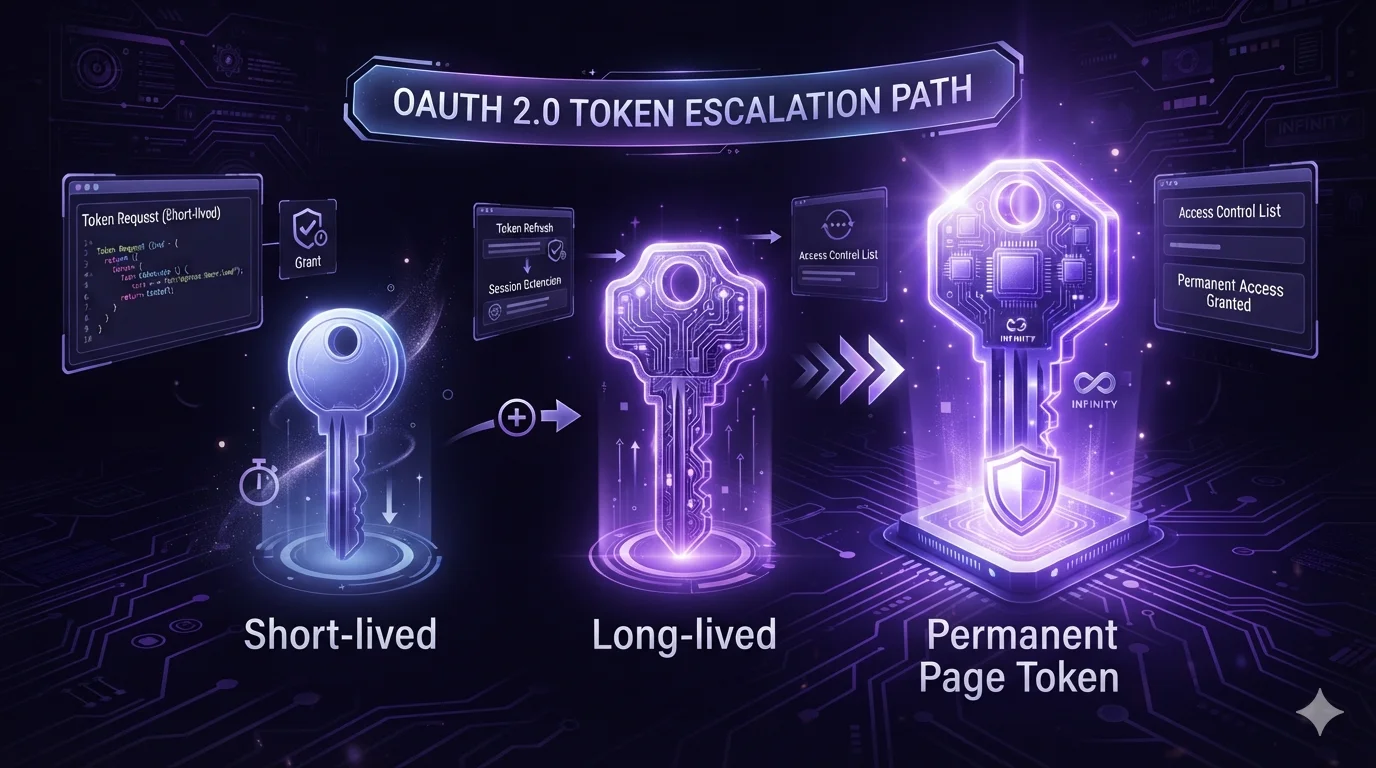
The most complex architectural hurdle in Meta Graph API configuration is resolving the access token expiration lifecycle. The default token provided by the Meta Graph API Explorer is a short-lived user token, which expires in roughly one to two hours. Hardcoding this temporary token into an n8n credential will cause the automated pipeline to fail almost immediately in production environments.
The token must be systematically escalated through a three-step cryptographic exchange. First, the short-lived user token is submitted to the Graph API’s OAuth endpoint (/oauth/access_token) alongside the application’s Client ID, Client Secret, and the grant_type parameter set to fb_exchange_token. The API responds with a long-lived user token, which remains valid for 60 days.
Second, utilizing this 60-day long-lived user token, a subsequent API GET request is executed against the /{user-id}/accounts endpoint. The response payload from this accounts endpoint yields a JSON array of the Facebook Pages administered by the user. Each page object within this array contains a unique Page Access Token. Because this specific Page token was derived from a long-lived user token, it inherits a permanent lifecycle; it structurally will not expire unless the user explicitly deauthorizes the application, changes their account password, or loses administrative privileges on the Page. This permanent Page Access Token is the definitive credential required for continuous n8n automation.
Configuring Content Scheduling and Deployment
With the Linux environment running n8n and the permanent Meta Page Access Token secured, the pipeline construction phase occurs within the n8n visual editor. Inside n8n, credentials must be isolated from the workflow logic to prevent accidental exposure during workflow exports or version control commits. The administrator navigates to the Credentials interface and creates a new “Facebook Graph API” credential object, inserting the permanent Page Access Token into the token field. Because the local n8n instance utilizes the previously configured N8N_ENCRYPTION_KEY, this token is encrypted at rest within the PostgreSQL database.
Content deployment via the Meta Graph API is executed through HTTP POST requests targeted at the /{page_id}/feed endpoint. While n8n offers a dedicated Facebook Graph API node, systems architects often prefer the standard HTTP Request node for granular control over the raw JSON payload and HTTP headers, particularly when handling advanced scheduling parameters or media chunking algorithms.
To schedule content, the JSON payload must adhere strictly to Meta’s timing constraints. The payload must include the published parameter set explicitly to false, alongside a scheduled_publish_time parameter. The scheduling time cannot be passed as a standard ISO 8601 string; the Meta Graph API strictly requires a UNIX timestamp, which is an integer representing the seconds elapsed since the Epoch. Furthermore, Meta enforces narrow scheduling windows: the timestamp must represent a future time between 10 minutes and 30 days relative to the exact moment the API call is received by Meta’s servers.
Within the n8n pipeline, an intermediate Code node or a Set node utilizing native JavaScript expressions is required to calculate this UNIX timestamp dynamically. The expression accesses the local time—which is accurately governed by the GENERIC_TIMEZONE environment variable—calculates the desired future offset required by the marketing calendar, and transforms the resulting object into the integer format required by the Graph API payload.
Once structured, the HTTP Request node fires the payload to the Graph API, utilizing the encrypted Page Access Token for Bearer authentication.
Verifying Live Posts and Implementing Error Resilience
A production-grade automation pipeline must anticipate failure states, particularly when interacting with external social media APIs subjected to rigorous rate limiting and structural volatility. Ensuring that content is successfully deployed and maintaining pipeline stability requires explicit verification logic and global error management strategies.
Following the execution of the HTTP POST request to the feed endpoint, the Meta Graph API returns a JSON response containing a unique id for the newly created post. For scheduled posts, the API specifically returns a scheduled_post_id. The architecture must capture this identifier. To verify the live or scheduled post, the pipeline should implement a subsequent HTTP GET request targeting /{post_id} to retrieve the post’s metadata, confirming its publication status or scheduled time directly from Meta’s database. Once verified, n8n can log this ID to a secondary database, a Google Sheet, or an internal notification channel like Slack, providing the marketing team with an immutable audit trail of automated actions.
Operating against the Meta Graph API necessitates handling strict computational constraints. Standard application-level rate limits restrict execution to 200 calls per hour per user, scaling dynamically based on overall application usage. When limits are breached, Meta responds with an HTTP 429 status code and a specific error sub-code representing a page-level or app-level throttle. Additionally, transient server congestion can trigger silent timeout failures or HTTP 500 errors from Meta’s backend infrastructure.
To mitigate these disruptions, the n8n HTTP Request node must be configured to utilize the native “Retry on Fail” capability. Setting the node to retry failed requests up to three times with an exponential backoff interval drastically reduces pipeline failures caused by temporary Meta API congestion. However, this retry logic must be paired with idempotency principles; generating a deterministic idempotency key for external API calls ensures that retries do not result in duplicate posts if a network timeout occurs after Meta has successfully processed the initial payload.
Node-level retries handle transient network issues, but permanent failures—such as an invalidated access token, a malformed scheduling timestamp, or a payload exceeding character limits—require workflow-level error routing. By default, a failed node execution in n8n silently stops the workflow, leaving the marketing payload unpublished with no external notification. To resolve this, the architecture requires a dedicated “Error Trigger” workflow. The Error Trigger is an independent n8n workflow designed to listen globally for failed executions across the local instance. When the Meta posting pipeline fails, the Error Trigger intercepts the failure payload, extracting the exact node name, the execution ID, and the explicit error message returned by Meta. This data is then formatted and routed to an engineering or marketing channel, providing immediate operational visibility and facilitating rapid debugging without necessitating manual review of the n8n execution logs. By synthesizing local container stability with sophisticated token lifecycle management and robust error routing, this self-hosted n8n architecture provides a highly resilient engine for Meta API content scheduling.


