
Introduction to Output Devices
In the fundamental information processing cycle (Input -> Process -> Output -> Storage), output devices play the critical role of translating processed data from a computer’s digital format into a form that is understandable to humans. They are the primary means by which computers communicate results back to the user. For any business, effective communication of information is paramount for decision-making, operations, and stakeholder engagement. From a financial analyst reviewing a detailed report on a high-resolution monitor to a marketing team printing brochures for a new campaign, output devices are indispensable tools across all business functions.
Visual Output Devices
Visual output is the most common form of computer output. These devices present information visually, in the form of text, graphics, and video.
1. Monitors (Display Screens)
A monitor is the primary visual output device for most computers, displaying the user interface and open applications. The quality of a monitor can significantly impact productivity and user comfort.
How Monitors Work (Working Principle):
All modern monitors work by controlling individual pixels (picture elements) — tiny dots of light that together form the image you see. A Full HD screen has over 2 million pixels (1920 × 1080), each capable of displaying different colors. The key difference between monitor technologies lies in how they illuminate and control these pixels.
Key Technologies & Working Principles:
- LCD (Liquid Crystal Display):
- Working Principle: LCD screens use a backlight (typically white LEDs) that shines through layers of liquid crystals. These crystals can twist to allow varying amounts of light through when an electrical current is applied. Color filters (red, green, blue) then create the final color for each pixel.
- Key Point: The liquid crystals don’t produce light themselves — they only control how much backlight passes through. This is why LCDs can appear washed out in very bright environments.
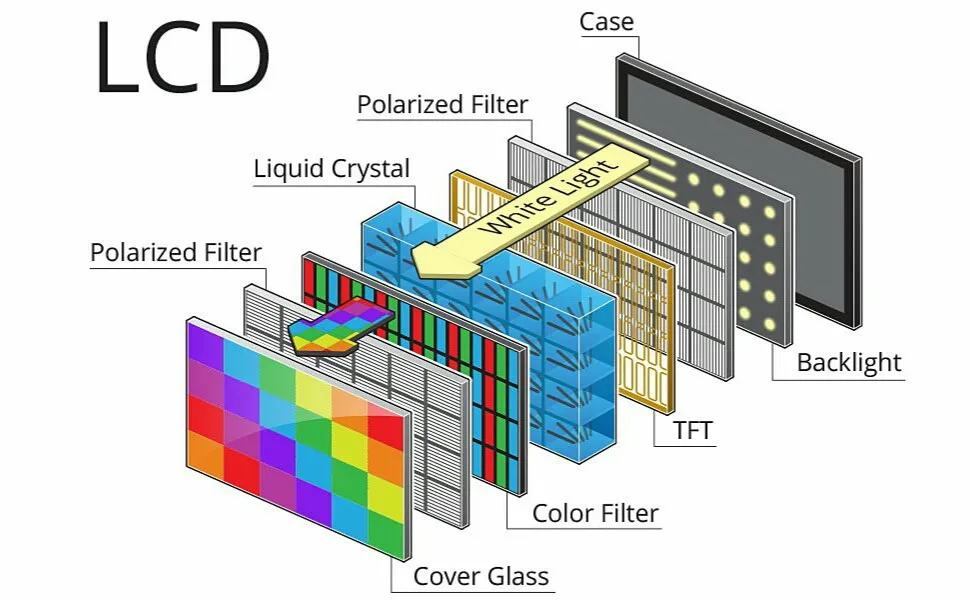 Figure: LCD Technology - Backlight shines through liquid crystal layers
- LED (Light-Emitting Diode):
- Working Principle: LED monitors are actually LCD monitors that use LEDs (instead of older fluorescent tubes) as the backlight source. Some advanced LED monitors use “local dimming” — turning off LEDs behind dark areas of the screen for better contrast.
- Key Point: LED is an improvement in backlight technology, not a fundamentally different display type from LCD.
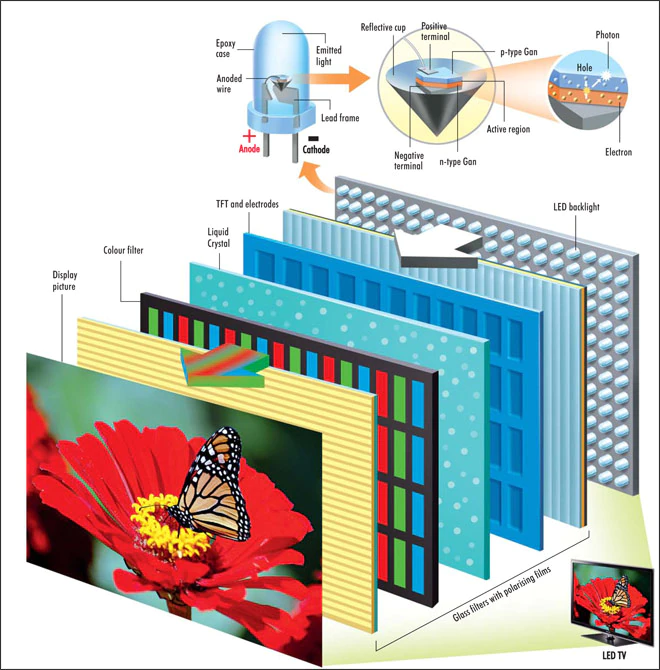 Figure: LED Technology - Light-emitting diodes provide efficient backlighting
- OLED (Organic Light-Emitting Diode):
- Working Principle: In OLED screens, each pixel is made of organic compounds that emit light when an electric current passes through them. Each pixel produces its own light independently — no backlight is needed.
- Key Point: Because individual pixels can be turned completely off, OLED displays can show “true black” (no light emission), resulting in infinite contrast ratios and thinner screens.
Key Specifications:
- Resolution: The number of pixels on a screen (e.g., Full HD is 1920×1080 pixels; 4K is 3840×2160 pixels). Higher resolution means a sharper, clearer image.
- Refresh Rate: How many times per second the image updates (measured in Hz). Higher refresh rates (120Hz, 144Hz) provide smoother motion.
- Aspect Ratio: The ratio of the width to the height of the screen (e.g., 16:9 is standard for widescreen).
Business Applications
- Finance: Financial analysts and traders use high-resolution, often dual-monitor setups, to view complex spreadsheets, stock market data, and multiple financial reports simultaneously. This enhances their ability to analyze data and make quick decisions.
- Marketing: Graphic designers and video editors require color-accurate, high-resolution monitors (often 4K or higher) to create visually compelling advertisements, social media content, and branding materials.
- Operations: In a manufacturing plant or logistics center, large monitors are used as dashboards to display real-time production metrics, supply chain status, and key performance indicators (KPIs), allowing managers to oversee operations at a glance.
- Human Resources (HR): HR professionals use monitors for daily tasks, but also for conducting video interviews and presenting digital training materials to employees.
2. Projectors
A projector is a device that takes a video signal and projects the corresponding image onto a projection screen or other surface.
How Projectors Work (Working Principle):
Projectors work by shining a powerful light through or reflecting it off a small image-generating element, then using lenses to magnify and project that image onto a large surface.
 Figure: Camera Obscura Principle - The foundation of projection technology
- DLP (Digital Light Processing): Uses millions of tiny mirrors on a chip (called a DMD — Digital Micromirror Device). Each mirror represents one pixel and can tilt toward or away from the light source thousands of times per second, creating the image. A spinning color wheel adds color.
- LCD (Liquid Crystal Display): Uses three LCD panels (one each for red, green, and blue). Light passes through these panels, which control how much of each color reaches the screen, then the colors are combined by a prism.
- Key Specifications: Brightness (measured in lumens), resolution, contrast ratio, and throw distance (how far the projector needs to be from the screen).
Business Applications
- Sales & Marketing: Projectors are essential for delivering presentations to clients, pitching ideas to investors, and showcasing products at trade shows and launch events.
- HR & Corporate Training: Used in training rooms and conference halls to present materials to large groups of employees during onboarding, workshops, and company-wide meetings.
- Operations & Management: Teams use projectors in meeting rooms to display project plans, Gantt charts, and collaborative documents, facilitating group discussion and strategic planning.
Print Output Devices
Print devices create a hard copy (a physical version) of digital information.
1. Printers
Printers render text and images from a computer onto paper. The choice of printer technology depends heavily on the specific business need, balancing cost, speed, and quality.
How Printers Work (Working Principles):
- Inkjet Printers:
- Working Principle: Tiny nozzles in the print head spray microscopic droplets of liquid ink onto paper. Modern inkjets use either thermal technology (heating the ink to create a bubble that pushes it out) or piezoelectric technology (using electrical charges to push ink droplets).
- Characteristics: Excellent for high-quality color and photo printing. Higher cost-per-page due to expensive ink cartridges. Best for low-volume, high-quality printing.
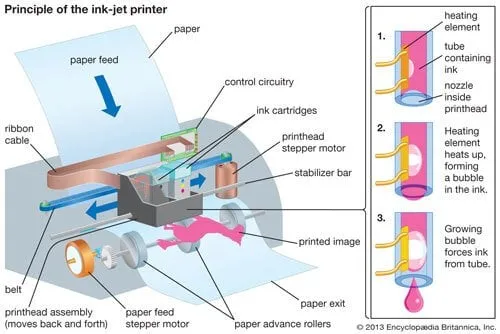 Figure: Inkjet Printer Mechanism - Tiny nozzles spray ink droplets onto paper
- Laser Printers:
- Working Principle: A laser beam “draws” the image onto a light-sensitive rotating drum, creating an electrostatic charge pattern. Powdered ink called toner sticks to the charged areas. The drum rolls over paper, transferring the toner, which is then permanently fused to the paper by heated rollers (the fuser unit).
- Characteristics: Fast, efficient, and low cost-per-page. Ideal for high-volume text documents. The standard choice for most office environments.
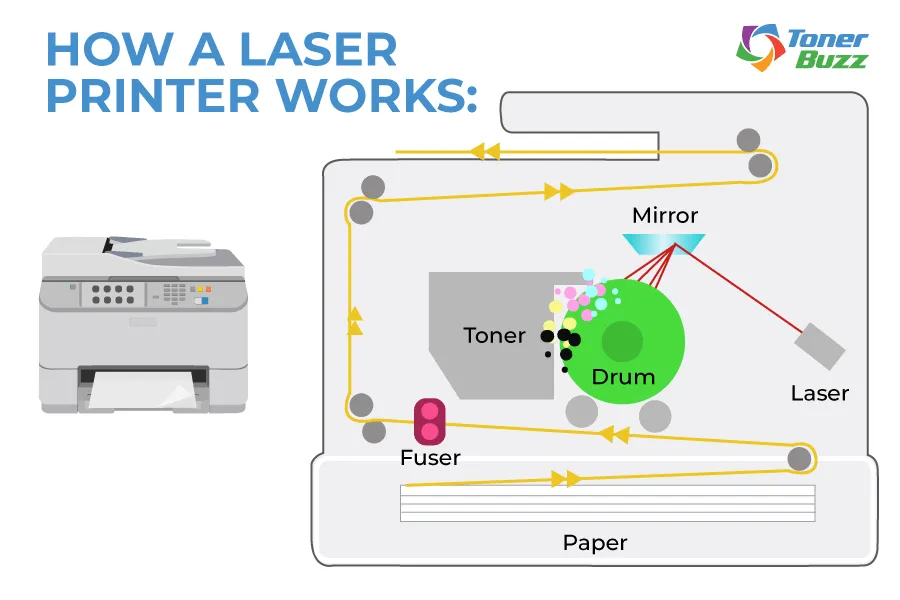 Figure: Laser Printer Mechanism - Toner fused to paper by heat
- 3D Printers (Additive Manufacturing):
- Working Principle: Most common type (FDM — Fused Deposition Modeling) works by heating a plastic filament and extruding it layer by layer to build a 3D object from the bottom up. Other types use lasers to cure liquid resin (SLA) or fuse powder materials (SLS).
- Characteristics: Transformative technology for product development, prototyping, and custom manufacturing.
 Figure: 3D Printing Process - Objects built layer by layer
Business Applications
- Finance & Accounting: Laser printers are used extensively to print invoices, purchase orders, financial statements, payroll slips, and audit reports. Banks in Nepal, for instance, print customer statements and transaction receipts daily.
- Operations:
- Printing shipping labels, barcodes, and packing slips is a critical step in the logistics and supply chain process.
- 3D printers are used for rapid prototyping, allowing engineers to create and test physical models of new products quickly and cheaply before committing to mass production.
- Marketing: High-quality inkjet or professional laser printers are used to produce brochures, flyers, direct mail, and other physical marketing collateral.
- HR: Printing official documents such as employment contracts, offer letters, policy handbooks, and termination letters.
Audio Output Devices
These devices produce sound, which can be used for communication, alerts, and entertainment.
1. Speakers and Headphones
Speakers and headphones convert digital audio signals into audible sound waves. While speakers broadcast sound to a group, headphones provide a private listening experience.
Business Applications
- Marketing & Customer Service: Call centers are a prime example. Customer service agents at companies like Ncell or Nepal Telecom rely on high-quality headsets (headphones with a microphone) to communicate clearly with customers. Audio is also used in video advertisements and for creating ambiance in retail stores.
- HR: Used for online training modules that include audio narration, webinars, and conducting remote interviews where clear audio is essential for effective communication.
- General Operations: In modern businesses, video conferencing tools like Zoom and Microsoft Teams are standard. Speakers and headphones are essential for all employees to participate in virtual meetings. Public Address (PA) systems in warehouses or large offices are a form of speaker system used for mass announcements.
Tactile Output Devices (Haptic Technology)
Haptic technology creates an experience of touch by applying forces, vibrations, or motions to the user. This is an emerging area of output that moves beyond sight and sound.
Examples:
- Vibrating alerts on a smartphone.
- Force-feedback joysticks and steering wheels for simulators.
- Haptic feedback gloves, which allow users to “feel” virtual objects in a VR/AR environment.
Business Applications
- Training & Simulation (Operations & HR): Haptic feedback is invaluable for creating realistic training simulators for pilots, surgeons, and heavy equipment operators. The tactile feedback (e.g., the rumble of an engine, the resistance of a surgical tool) creates a more effective and safer learning environment.
- Product Design & Marketing: Automotive companies can use haptic technology to allow potential customers in a virtual showroom to “feel” the texture of the steering wheel or the click of a button before a car is even manufactured.
- Accessibility: For visually impaired users, haptic feedback on touchscreens can confirm a button press or help them navigate an interface, making technology more accessible.
Real-World Examples in Nepal
-
Digital Signage in Nepali Banking (Visual Output): Walk into a branch of NIC Asia Bank or Nabil Bank, and you will see multiple monitors used as digital signage. These displays serve several business functions simultaneously. For Marketing, they show advertisements for new loan products or credit cards. For Operations, they display queue management numbers, directing customers to the correct counter. For Finance, they show real-time foreign exchange rates. This is a perfect example of how a simple output device (a monitor) can be a multi-purpose business tool.
-
Logistics and Printing at Daraz Nepal (Print Output): The e-commerce giant Daraz relies heavily on printers for its core operations. Every single order that is processed requires a printed shipping label containing the customer’s address, a unique tracking barcode, and other shipping information. Without the reliable, high-volume output of laser printers at their fulfillment centers, their entire logistics and delivery network would grind to a halt. This shows how a seemingly basic output device is mission-critical for a modern digital business.
-
Customer Service at eSewa/Khalti (Audio Output): Nepal’s leading digital wallets, eSewa and Khalti, manage millions of users. Their customer support centers are crucial for resolving user issues. Agents use headsets (audio output and input) to handle phone calls efficiently. The clarity of the audio output directly impacts the quality of customer service and the company’s reputation. This is a direct application of audio technology in the Marketing (customer relations) and Operations (service delivery) functions.
Key Takeaways
- Output devices are the essential link between processed digital data and human users.
- The choice of an output device is dictated by the specific task and business function it needs to serve.
- Visual devices (monitors, projectors) are crucial for data analysis, presentations, and daily work.
- Print devices (printers) are vital for creating hard copies of official documents, financial records, and operational necessities like shipping labels.
- Audio devices (speakers, headphones) are central to modern communication, customer service, and training.
- Emerging tactile devices (haptic technology) are opening new possibilities for realistic training, product design, and enhanced user experiences.
Review Questions
- A small accounting firm in Kathmandu needs to print hundreds of multi-page financial reports and invoices each month. Would you recommend an inkjet or a laser printer? Justify your answer based on speed, volume, and cost-per-page.
- Describe two different ways a projector could be used by the Human Resources (HR) department of a large company.
- Explain why a high-resolution monitor is more important for a graphic designer at a marketing agency than for a cashier at a supermarket.
- How do audio output devices like headsets contribute to the operational efficiency of a company like Daraz or eSewa?


