
Introduction to Storage Devices
In the modern business landscape, data is often considered the most valuable asset. From customer information and financial records to marketing materials and operational plans, every piece of information a business generates or collects must be stored securely and accessibly. Storage devices are the fundamental hardware components responsible for this task. They are a form of non-volatile memory, meaning they retain stored information even when the power is turned off. Unlike primary memory (RAM), which is temporary, storage devices provide long-term retention of data. For any business, selecting the right type of storage is a critical decision that impacts system performance, data security, operational efficiency, and overall cost.
Key Types of Secondary Storage
While Primary Storage (like RAM) holds data the computer is actively using, Secondary Storage is where data is kept for the long term. The most common types used in business are Hard Disk Drives (HDDs), Solid-State Drives (SSDs), and various forms of external storage.
1. Hard Disk Drives (HDDs)
A Hard Disk Drive (HDD) is a traditional storage device that uses magnetism to store data. It consists of one or more rapidly rotating platters coated with magnetic material. A read/write head on a mechanical arm moves across the platter to read and write data.
- How it Works: Think of it like a miniature, high-speed record player. The head finds the right track and sector on the spinning disk to access the data.
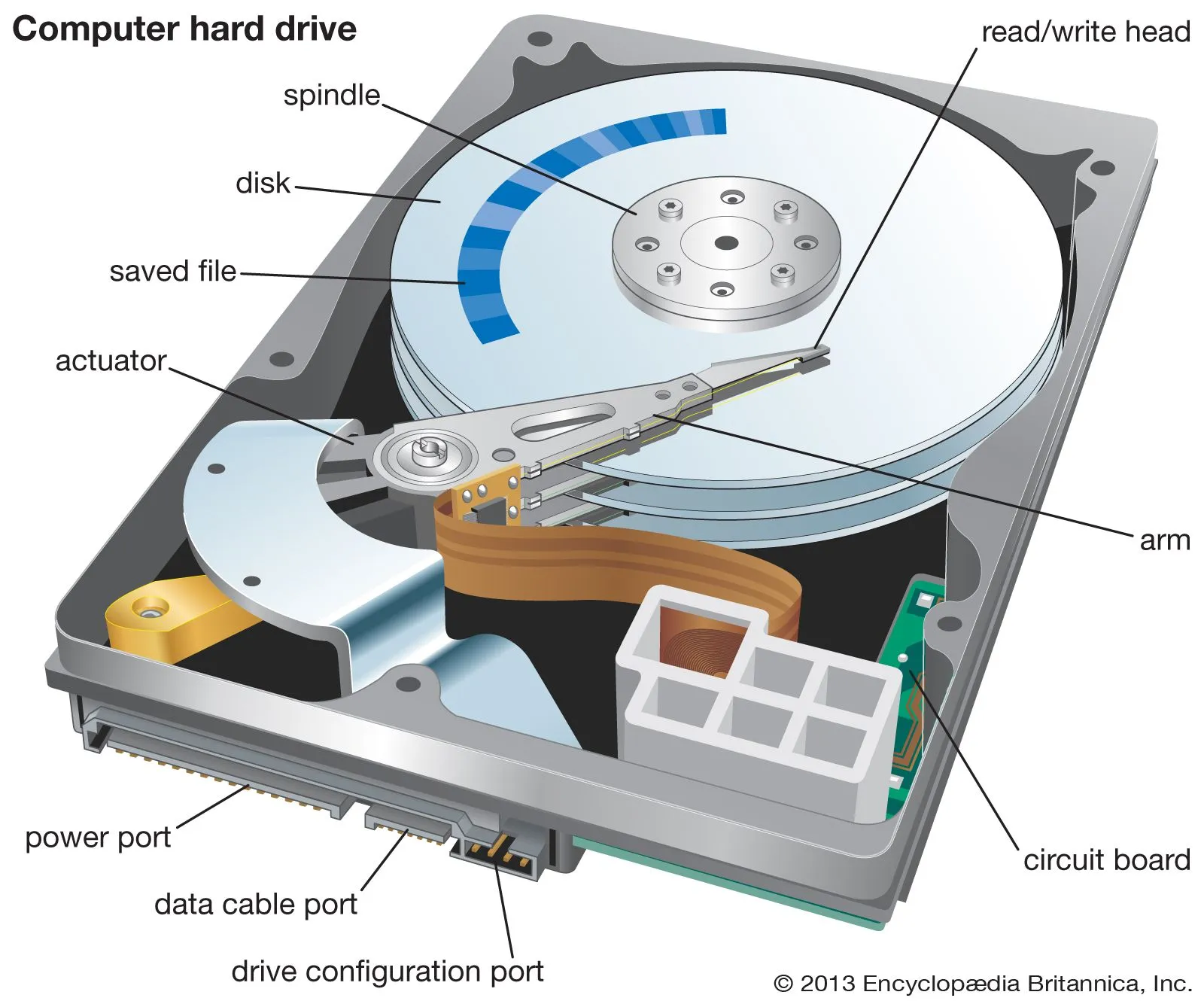 Figure: Inside a Hard Disk Drive - Spinning platters and read/write head
- Key Characteristics:
- High Capacity: HDDs offer very large storage capacities (multiple terabytes) at a relatively low price.
- Low Cost per Gigabyte: This makes them ideal for storing large amounts of non-critical or archival data.
- Slower Speed: The mechanical nature of HDDs means they are significantly slower at reading and writing data compared to SSDs.
- Less Durable: Moving parts make them more susceptible to damage from drops or shocks.
2. Solid-State Drives (SSDs)
A Solid-State Drive (SSD) is a more modern storage device that uses interconnected flash-memory chips to store data. Unlike an HDD, it has no moving parts.
- How it Works: Data is stored in semiconductor cells. Accessing data is nearly instantaneous because there are no physical parts that need to move into position.
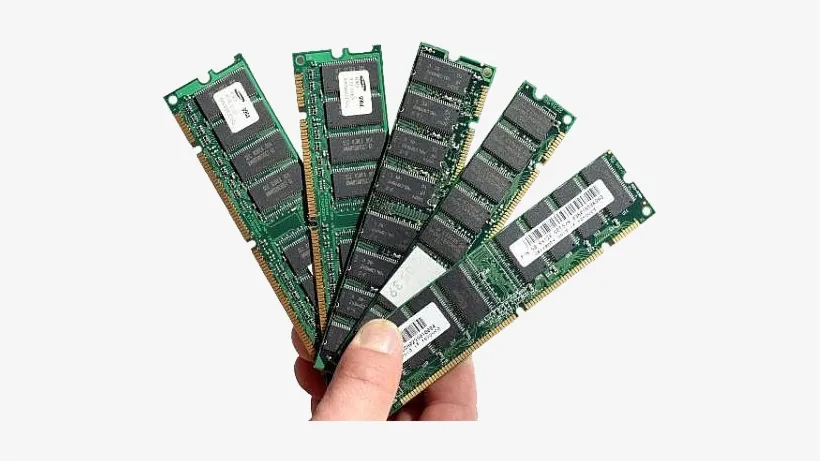 Figure: Flash Memory Chips - The technology behind SSDs
- Key Characteristics:
- High Speed: SSDs are dramatically faster than HDDs. This leads to faster computer boot times, quicker application loading, and more responsive system performance.
- High Durability: With no moving parts, they are much more resistant to physical shock and damage.
- Lower Power Consumption: They use less energy, which is beneficial for laptops (longer battery life) and data centres (lower electricity bills).
- Higher Cost per Gigabyte: While prices have decreased, SSDs are still more expensive than HDDs for the same amount of storage.
| Feature | Hard Disk Drive (HDD) | Solid-State Drive (SSD) |
|---|---|---|
| Technology | Magnetic, spinning platters | Flash memory, no moving parts |
| Speed | Slower | Significantly Faster |
| Cost | Lower cost per GB | Higher cost per GB |
| Durability | Fragile due to moving parts | Highly durable, shock-resistant |
| Best For | Bulk storage, archives, backups | Operating systems, applications, databases |
 Figure: HDD vs SSD Speed Comparison - SSDs are significantly faster
3. External Storage
External storage devices are standalone units that connect to a computer, typically via a USB port. They provide portability and are excellent for backups and data transfer.
- External HDDs: Offer large capacity at a low cost, perfect for backing up entire systems or archiving large project files.
- External SSDs: Provide the speed and durability of internal SSDs in a portable format. Ideal for professionals who need to transfer and work with large files (e.g., video editors, designers) on the go.
- USB Flash Drives (Pen Drives): Small, portable, and inexpensive devices used for quickly transferring smaller files between computers.
The Role of Storage in Business Operations
The choice between HDD, SSD, and external storage directly impacts the efficiency of every business department.
- Finance & Accounting:
- Application: Storing years of financial transaction data, audit logs, and customer invoices. Running accounting software like Tally or complex financial modeling spreadsheets.
- Storage Choice: An SSD is crucial for the main computer running the accounting software to ensure reports are generated quickly. Large-capacity HDDs are used in servers for archiving historical financial records to comply with legal requirements.
- Human Resources (HR):
- Application: Managing a database of employee records, including CVs, contracts, performance reviews, and payroll information.
- Storage Choice: Reliability and security are key. Data is often stored on a central server. SSDs provide quick access to employee files, while regular backups are made to external HDDs or a secondary server for disaster recovery.
- Operations & Supply Chain:
- Application: Running Enterprise Resource Planning (ERP) systems, managing inventory databases, and tracking logistics data. These systems handle thousands of transactions per minute.
- Storage Choice: The core database for the ERP system must run on high-speed SSDs to prevent bottlenecks in operations. Historical sales and inventory data can be archived on cheaper HDDs.
- Marketing:
- Application: Storing large multimedia files like high-resolution images, 4K video footage for advertisements, and graphic design projects. Managing a Customer Relationship Management (CRM) database.
- Storage Choice: Marketing professionals’ computers benefit greatly from SSDs to quickly open and edit large media files. The central server for storing the final video assets and campaign archives would use high-capacity HDDs.
Real-World Examples (with a focus on Nepal)
- Nepali Commercial Banks (e.g., Nabil Bank, NIC Asia Bank):
- Banks handle a massive volume of transactions every second through their Core Banking System (CBS). To ensure customer transactions (deposits, withdrawals, transfers) are processed instantly without delay, the servers running the CBS database use high-performance, enterprise-grade SSDs. However, for long-term storage of millions of customer statements and compliance documents required by Nepal Rastra Bank, they use vast arrays of high-capacity HDDs in their data centres, as cost-effectiveness for archival is a priority.
- e-Commerce Platforms (Daraz Nepal):
- The user experience on Daraz is directly tied to storage speed. The web servers that host the website and product images use SSDs to ensure pages load almost instantly. A slow-loading page could cause a customer to leave. Behind the scenes, Daraz collects enormous amounts of data on user behaviour, purchases, and product views. This “big data” is stored on large HDD-based servers and is used by data analysts to identify trends and plan marketing campaigns.
- Digital Wallets (eSewa, Khalti):
- For a digital wallet, transaction speed and reliability are everything. When a user pays a bill or transfers money, the transaction must be logged and confirmed in a fraction of a second. The entire core infrastructure of companies like eSewa and Khalti runs on the fastest available SSDs (specifically NVMe SSDs). Using slower HDDs would introduce unacceptable delays, destroying user trust and making the service unusable. They cannot compromise on speed.
Key Takeaways
- Storage devices provide non-volatile, long-term storage for business data.
- HDDs are best for bulk data storage and archives where cost is more important than speed (e.g., old financial records, large video archives).
- SSDs are essential for applications where speed is critical, such as operating systems, databases, and frequently used software. They significantly boost overall system performance and employee productivity.
- External Storage is vital for data portability, backups, and secure offline storage.
- The right storage strategy involves a mix of technologies tailored to the specific needs of each business function, balancing performance, capacity, and cost.
Review Questions
- Explain the primary difference between an HDD and an SSD in terms of their underlying technology.
- Why would a company like Daraz use both SSDs and HDDs in its IT infrastructure? Provide a specific use case for each.
- Describe a scenario where an HR manager would rely on an external storage device.
- How does the choice of storage (SSD vs. HDD) for a company’s main accounting server impact the Finance department’s efficiency?


