Headless Document Generation: A Technical Analysis
Architecting Headless Document Generation: Templating Engines, Data Injection, and Serverless Deployment

The transition from manual desktop document creation to automated, headless document generation represents a critical evolution in modern enterprise software architecture. Organizations managing high volumes of contracts, invoices, compliance reports, and legal agreements can no longer rely on fragile mail-merge operations bound to specific desktop word processors. Instead, modern systems demand robust, server-side data injection mechanisms capable of rendering complex legal templates into polished DOCX and PDF files programmatically. To achieve this, architectures must seamlessly integrate structured data—typically formatted as JavaScript Object Notation (JSON)—into templating engines without degrading the underlying stylistic rules, pagination controls, or legal structures of the original document.
This exhaustive report provides a deep technical analysis of document templating paradigms, focusing on JavaScript-native engines such as docxtemplater and docx-templates, LibreOffice-backed engines like Carbone, and text-to-document pipelines utilizing Pandoc and Typst. Furthermore, it explores the intricate mechanics of manipulating OpenXML structures to ensure absolute formatting fidelity for dynamic tables and signature blocks, followed by an analysis of deploying these resource-intensive generation pipelines within serverless environments such as AWS Lambda. Finally, the report addresses the stringent security governance required to mitigate template and XML injection vulnerabilities inherent in document automation.
Evaluating Document Templating Engines and Ecosystems
The core of any headless document generation pipeline is the templating engine. Historically, programmatic document builders required developers to construct files from scratch via complex Application Programming Interfaces (APIs). This approach proved notoriously brittle; translating a corporate lawyer’s visual layout into raw code meant that every minor stylistic change required a software deployment. Conversely, modern template-based engines parse an existing DOCX file, identify placeholder tags, and inject dynamic data while preserving the native formatting defined by the original author.
Docxtemplater: Enterprise-Grade OpenXML Manipulation
docxtemplater has established itself as one of the most resilient and widely adopted libraries for generating DOCX, PPTX, and XLSX documents. It operates by substituting placeholder tags, such as {first_name}, with corresponding values from a JSON data object provided at runtime.
| One of the most significant architectural advantages of docxtemplater is its reliance on the Angular parser via the angular-expressions package. Basic templating engines often only map exact JSON keys to tags, which forces backend developers to pre-compute every possible string permutation before passing the data to the engine. The integration of the Angular parser allows docxtemplater to evaluate complex expressions directly within the document template. This enables the execution of conditional logic, binary operators, and programmatic filters directly inside the template. For example, template designers can utilize syntax such as **{price * 1.2 | currency}** or **{#users | where:’age > 18’}** to dynamically calculate taxes or filter arrays without altering the backend data payload. |
While the core docxtemplater library is open-source and provides basic replacement and looping, advanced enterprise requirements are met through a suite of premium modules. These modules fundamentally alter the Abstract Syntax Tree (AST) processing of the engine to support complex document structures. The Table Module facilitates the creation of dynamic tables from two-dimensional data arrays, supporting advanced configurations such as dynamic column widths, exact height rules, and vertical or horizontal cell merging using specific syntax like {:vtusers}. The Image and HTML Modules allow the programmatic injection of base64 strings, file buffers, or dynamically fetched URLs as images, as well as the insertion of raw HTML that the engine natively translates into WordprocessingML elements. Furthermore, the Styling Module enables dynamic restyling of paragraphs, cells, or rows based on data inputs, using tags like {:stylepar s1} to alter font colors, borders, and alignment programmatically during the generation phase.
For organizations operating outside the Node.js ecosystem, robust ports and alternative implementations exist. The DocxTemplater package for .NET provides comparable functionalities for C# applications, allowing developers to bind OpenXML formatters directly to object properties. By utilizing libraries like DynamicExpresso.Core, the .NET port supports string concatenation, complex logic, and null handling directly within the placeholder tags, ensuring that enterprise applications built on Microsoft stacks can achieve similar levels of headless automation.
Docx-Templates: JavaScript-Native Sandboxing and Inline Queries
An alternative paradigm is championed by docx-templates, a library built on the philosophy of co-locating data queries and logic directly with the view components. Drawing inspiration from declarative data fetching models like GraphQL and Relay, docx-templates allows template designers to embed actual JavaScript snippets directly into the DOCX file.
The engine utilizes customizable delimiters, typically +++ or {{ }}, and supports explicit command structures that drive the document assembly. The +++FOR item IN items+++ command initiates a loop over an array, with the engine injecting elements until the corresponding +++END-FOR item+++ tag is reached, allowing for the dynamic duplication of lists or table rows. The +++IF condition+++ command evaluates a JavaScript boolean expression to determine if a specific legal clause, liability waiver, or conditional paragraph should be rendered in the final output. Furthermore, the +++IMAGE qrCode(url)+++ command allows the execution of user-defined asynchronous functions, which are injected via the additionalJsContext parameter during runtime, to dynamically generate and insert image buffers such as QR codes or external charts.
By executing all embedded snippets inside a dedicated Node.js Virtual Machine, docx-templates provides immense flexibility, allowing developers to utilize native JavaScript array methods like .filter() or .sort() directly within the document text. However, this architectural choice carries significant deployment considerations. When running the engine in restricted environments such as browser Web Workers, the default sandbox mode polyfills require access to the iframe API, which is unavailable in worker contexts. In such scenarios, developers must instantiate the engine with the noSandbox: true configuration, a decision that requires strict trust in the template creators to prevent arbitrary code execution.
Carbone: The LibreOffice-Backed Engine
Carbone approaches document generation differently by decoupling the templating syntax from the underlying XML schema of the document and relying directly on the LibreOffice rendering engine for format conversion. Using a syntax like {d.companyName}, Carbone injects data into DOCX, XLSX, or ODT files, utilizing built-in formatters rather than executing arbitrary JavaScript.
Its primary differentiator is its built-in capability to output directly to PDF and other formats by managing headless LibreOffice workers. Carbone’s architecture includes a job queue that automatically starts LibreOffice in server-mode, manages multiple worker threads to maximize performance, and restarts workers if they crash during heavy rendering tasks. While highly effective for straightforward reporting and providing a unified pipeline for JSON-to-PDF generation, its heavy reliance on the LibreOffice binary makes it slightly more cumbersome to deploy in highly constrained serverless environments compared to pure JavaScript OpenXML manipulators.
| Templating Engine | Evaluation Mechanism | Advanced Table Handling | PDF Conversion Capability | Primary Target Ecosystem |
|---|---|---|---|---|
| docxtemplater | angular-expressions (CSP sandboxed) | Premium Table Module (vertical/horizontal merges) | Requires external engine (e.g., LibreOffice/Gotenberg) | Node.js, Browser, .NET (via ports) |
| docx-templates | Node VM (JavaScript execution) | Native nested FOR and END-FOR commands | Requires external engine | Node.js, Browser, Deno, Web Workers |
| Carbone | Built-in custom formatters | Native Mustache-like loop formatting | Built-in via headless LibreOffice workers | Node.js (Server-side optimized) |
Data Injection Mechanics for Complex Legal Templates
Legal documents, financial reports, and compliance certificates are governed by strict typographical standards. Transitioning from a static template to a fully automated pipeline requires addressing specific mechanical challenges within the OpenXML specification, as manipulating the raw XML without understanding its hierarchy will corrupt the document.
Overcoming the “Split Run” Dilemma
A pervasive and frustrating issue in headless DOCX generation is the phenomenon of “split runs.” The DOCX format is fundamentally a ZIP archive containing interconnected XML files, with the primary content residing in word/document.xml. Within this XML schema, strict ordering is enforced. Text is stored in paragraphs (**
When a template creator types a placeholder like {client_name} into Microsoft Word, the application’s spelling checker, grammar engine, or subtle formatting adjustments often fracture the text across multiple runs.
Instead of a single contiguous text node, the resulting XML might look fragmented, separating the brackets from the variable name:
Dynamic Tables and Repeating Clauses
Injecting variable-length data, such as a schedule of fees, an inventory manifest, or a list of signatories, requires the engine to duplicate structural elements without corrupting the XML tree. The templating engine must determine whether a loop tag is intended to duplicate a word, a paragraph, or an entire table row.
In docxtemplater, table iteration requires precise spatial awareness of the XML structure. By placing the start of the loop ({#items}) in the first cell of a row and the end of the loop ({/items}) in the last cell, the engine’s parser identifies that the tags span across table cell (**
For docx-templates, table rows are duplicated by inserting +++FOR row IN rows+++ in the first column and +++END-FOR row+++ in the final column, operating under similar logic. Advanced structures, such as conditionally displaying a specific row or dynamically generating horizontal columns, require careful nesting of these logic blocks. For example, rendering dynamic columns based on a dataset requires placing a loop inside a single cell that instructs the engine to duplicate the **
Interactive Places and Digital Signature Blocks
In automated contract generation, documents must often be routed for electronic signatures post-generation. This requires more than simply printing a name; it demands placing exact spatial coordinates or text anchors for digital signature providers to overlay their cryptographic signing fields. Platforms handling this orchestration distinguish between content injection and positional placeholders.
Template fields are utilized to inject raw data—such as counterparty names, effective dates, and monetary values—directly into the DOCX XML structure before the document is rendered. Conversely, interactive places utilize specific syntax formats, such as [[signature_buyer]], to define positional bounding boxes for signature fields, initials, checkboxes, or dropdown menus. When the document is processed by the e-signature API, these positional tags are stripped from the visible text and replaced with interactive widgets mapped to specific recipients. By combining OpenXML text substitution with structural placeholder tags, the resulting PDF contains perfectly formatted, pre-filled data alongside flawlessly aligned interactive zones ready for execution.
Maintaining Formatting and Stylistic Fidelity
Ensuring that dynamic tables, signature blocks, and legal clauses remain perfectly formatted requires a profound understanding of the WordprocessingML schema, specifically the properties that dictate pagination, content flow, and style inheritance.
Pagination Controls: keepNext, keepLines, and cantSplit
Legal clauses must remain visually and contextually cohesive; a signature block separated from its preceding paragraph by an arbitrary page break renders a contract aesthetically unacceptable and potentially legally ambiguous. The OpenXML specification provides specific paragraph properties (**
The **
Similarly, the **
Tables containing critical financial data or itemized schedules can become illegible if a single row fractures across two pages. In OpenXML, disabling row breaking is managed at the table row properties level. When generating tables, or converting HTML to DOCX using libraries like @turbodocx/html-to-docx, setting the cantSplit boolean to true prevents the row from fracturing, forcing the entire row to the subsequent page if necessary. These properties must be explicitly preserved by the templating engine during data injection. If a library naively overwrites the **
Style Inheritance and Raw XML Injection
When raw text substitution is insufficient, systems must inject complex, pre-formatted content. docxtemplater provides the {@rawXml} tag, allowing developers to inject complete OpenXML blocks into the document. This is highly useful for inserting external files or pre-rendered structural components. However, raw XML injection operates strictly at the paragraph level, meaning the injected XML completely replaces the surrounding **
To inject styled text inline—within an existing paragraph without destroying it—specialized techniques are required to manipulate the **
Markdown to PDF/DOCX Pipelines: Pandoc and Typst
While DOCX templating is ideal for forms and contracts pre-designed in Microsoft Word by business users, technical documentation, operational manuals, and developer-centric reports benefit significantly from a plain-text source of truth. Converting structured Markdown into stylized DOCX or PDF files relies heavily on Pandoc and emerging typesetting engines like Typst, which offer version-controllable document generation.
Preserving Styles with Pandoc
Pandoc serves as the industry standard for converting between diverse markup formats. It parses input documents into a universal Abstract Syntax Tree before rendering them into the target format, ensuring high-fidelity structural conversion.
A historic limitation of programmatic Markdown-to-DOCX conversion was the complete loss of corporate branding and custom styling. Pandoc solves this via the –reference-doc architecture. Developers can generate a default reference document, modify the styles (e.g., altering the font and color of “Heading 1” or “Body Text”) within Microsoft Word’s Style Pane, and pass this document back into the Pandoc compiler.
Furthermore, by enabling the +styles extension, Pandoc allows authors to map custom Word styles directly from the Markdown source using bracketed spans or fenced divs. For example, a Markdown file can define a block as ::: {custom-style=”LegalClause”} and an inline string as [John Doe]{custom-style=”SignatureName”}. During compilation, Pandoc maps these attributes to the exact paragraph and character styles defined in the reference DOCX. This bidirectional style mapping ensures that content generated from plain-text databases can natively adopt the exact visual specifications of a highly controlled legal or corporate template.
Typst: The Modern Engine for Data-Driven PDFs
For direct-to-PDF pipelines where intermediate Word documents are unnecessary, Typst has rapidly gained traction as a highly performant, modern alternative to LaTeX. Written in Rust, Typst compiles complex documents with advanced mathematical typesetting in milliseconds and features a modern, predictable scripting language.
Crucially for headless document automation, Typst natively supports JSON and CSV data loading. Using the json() function, templates can dynamically read structured data payloads and iterate over them to build tables, organizational charts, and conditional blocks natively within the document code. This eliminates the need for an external templating language; the data ingestion, logic evaluation, and typesetting occur simultaneously within the Typst compiler.
Tools and Command Line Interfaces (CLIs) leverage this capability to generate business documents entirely offline, embedding custom fonts and localizations directly into the build process without requiring a massive system-wide installation.
Pandoc can also output directly to Typst using the Typst Writer, mapping structural elements and custom properties via the typst:prop attribute to native Typst code. This bridges the gap between simple Markdown authoring and high-fidelity, data-driven PDF rendering.
Serverless Architecture for Document Generation
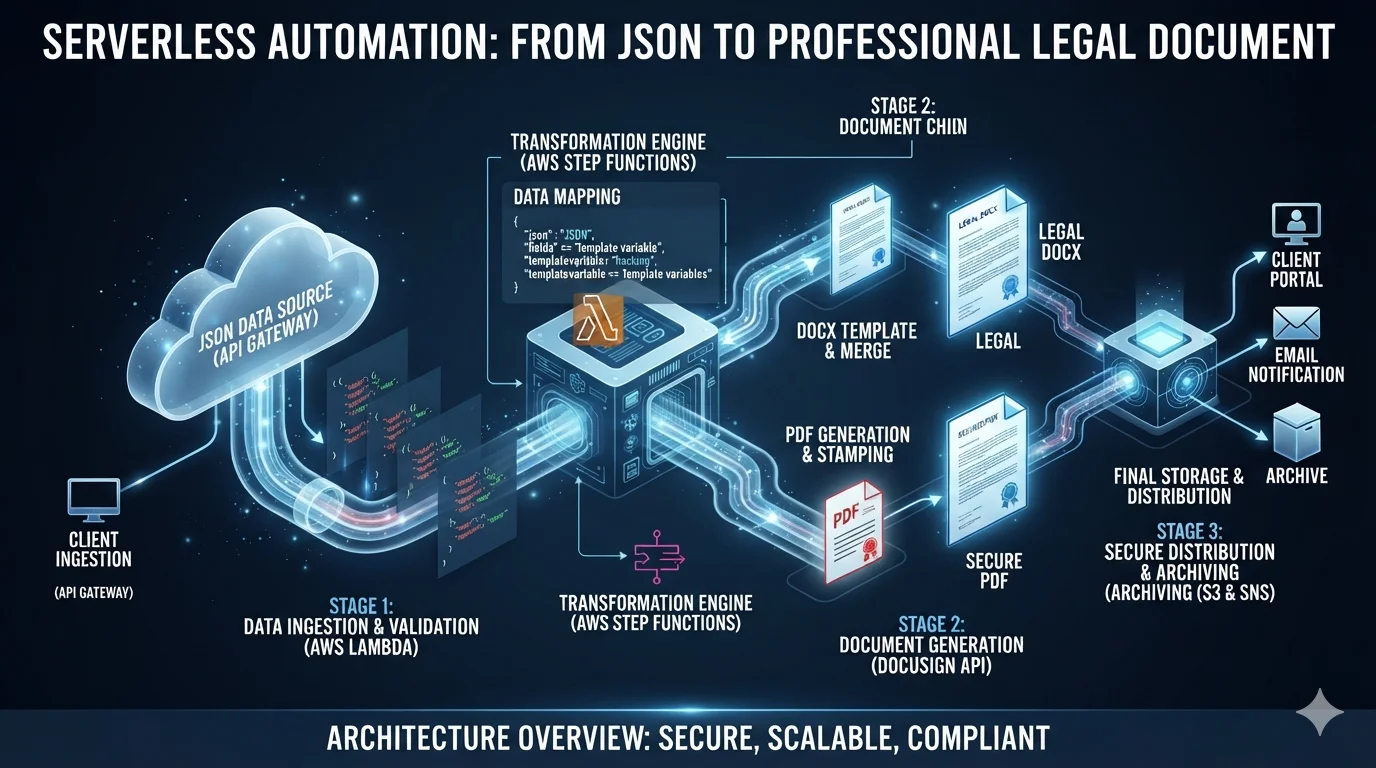
Executing document generation pipelines—particularly those requiring heavy PDF conversion—demands significant, burstable compute resources. Deploying these workloads on serverless architectures, such as AWS Lambda, provides massive horizontal scalability and cost efficiency, but introduces strict physical constraints regarding payload size, memory limits, and execution timeouts.
Overcoming Container and Binary Limitations
Converting a templated DOCX to a PDF with perfect visual fidelity generally requires a robust rendering engine like LibreOffice, as pure JavaScript libraries cannot perfectly replicate Microsoft Word’s proprietary layout algorithms, font rendering, and complex table calculations. However, a full LibreOffice installation exceeds several gigabytes, far surpassing AWS Lambda’s traditional 250 MB unzipped deployment limit.
To successfully deploy LibreOffice or Pandoc within AWS Lambda, architects utilize two primary strategies:
- Stripped Binaries in Lambda Layers: Compiling the binary for Amazon Linux and using the strip command to remove shared object symbols reduces the size to approximately 110 MB. This allows for fast deployment and easy integration with existing ZIP-based functions, though it often lacks custom fonts and can be complex to upgrade.
- Container Image Deployments: Packaging an unstripped distribution alongside custom CJK fonts and Node.js logic into an Elastic Container Registry (ECR) image. The 10 GB size limit allows for a full engine installation, reproducible builds, and perfect font rendering, although image pulling can slightly increase initial cold start latency.
When executing PDF conversions, the Lambda environment must also be configured with specific environment variables, such as FONTCONFIG_PATH=/opt/fonts, to ensure the headless binary can locate corporate fonts for accurate rendering. Additionally, file conversion requires significant disk I/O; architects must utilize Lambda’s expanded /tmp space—which can now be provisioned up to 10 GB—to handle the processing of massive documents.
Optimizing the Cold Start Penalty
In a serverless environment, a “cold start” occurs when the cloud provider must provision a new microVM, load the runtime, download the deployment artifact, and initialize the code before executing the function. Document generation binaries, due to their size and complexity, exacerbate this initialization penalty.
Extensive performance testing across Lambda architectures indicates that memory allocation is the primary lever for mitigating cold starts. Because AWS allocates CPU power linearly in proportion to the allocated memory, a Lambda function provisioned with 3,000 MB of memory will unpack and initialize a LibreOffice container or a WeasyPrint layer exponentially faster than one provisioned with 512 MB.
Furthermore, the choice of the wrapper’s runtime language plays a pivotal role. Interpreted languages like Node.js and Python suffer significantly lower cold start latencies compared to statically typed runtimes like Java or C, which can take exponentially longer to initialize their class loaders. Therefore, a best-practice architecture utilizes a lightweight Node.js or Python handler to receive the event and spawn the LibreOffice or Pandoc child process, maximizing initialization speed.
Event-Driven Orchestration
Serverless document generation is rarely implemented as a synchronous HTTP request. Generating complex PDFs can take several seconds to minutes, which conflicts with strict API Gateway timeout limits (typically 29 seconds). A resilient architecture employs an asynchronous, event-driven model.
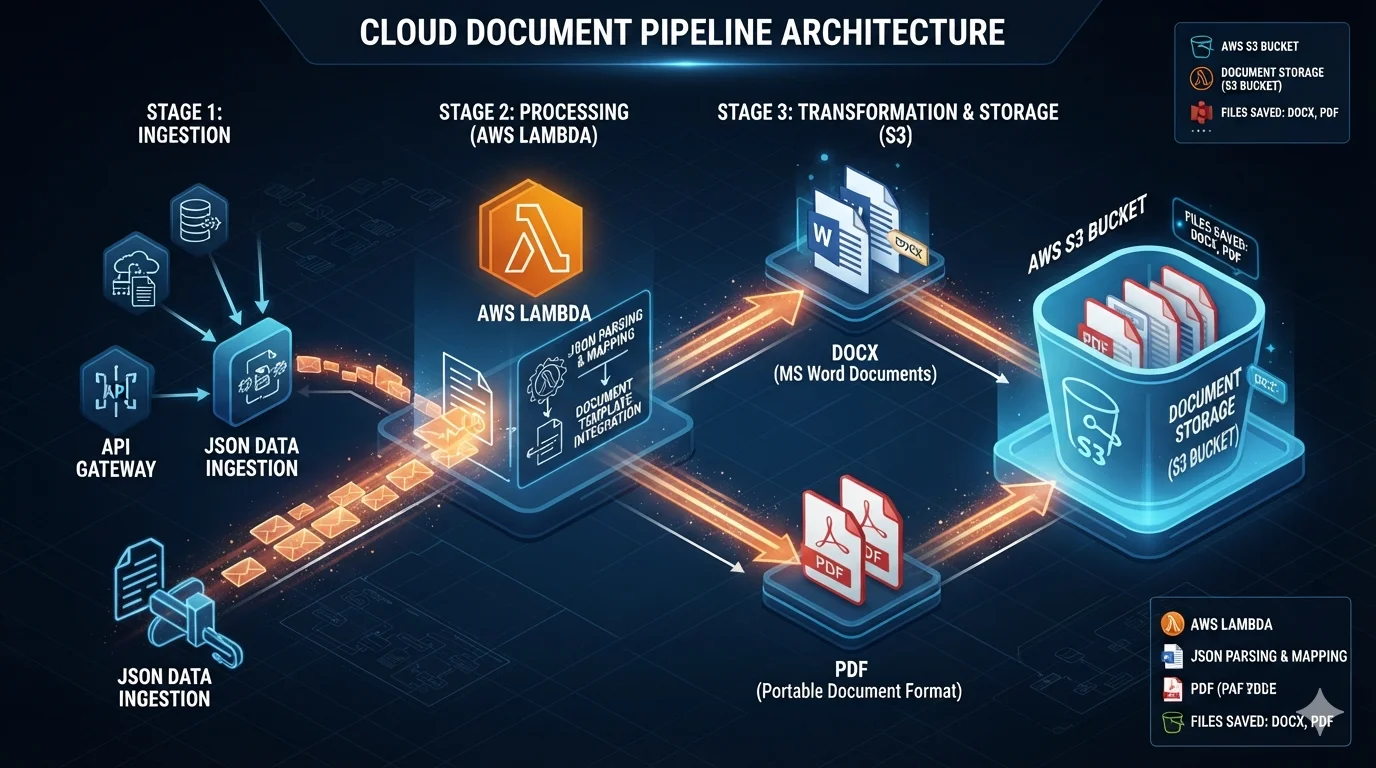
In this pattern, an API Gateway receives the JSON payload and places it onto an Amazon SQS queue or an EventBridge bus. A lightweight Lambda function processes the queue, injects the data into the DOCX template using docxtemplater, and writes the intermediate DOCX to an Amazon S3 bucket. An s3:ObjectCreated event then triggers the heavy LibreOffice conversion Lambda, which downloads the DOCX to /tmp, executes the headless conversion process, and uploads the finalized PDF back to S3. Finally, an Amazon SNS notification alerts the downstream application that the document is ready for distribution or electronic signature routing. This decoupled architecture ensures that the system can process thousands of concurrent generation requests without overwhelming the API layer or timing out.
Security and Governance in Document Automation
Automated document pipelines handle highly sensitive Personally Identifiable Information (PII), confidential financial data, and proprietary legal terms. Consequently, the templating engine and the document parsers themselves can become severe attack vectors if improperly configured.
Mitigating XML External Entity (XXE) Injection
Because a DOCX file is fundamentally an XML archive, any backend system processing it is inherently vulnerable to XML External Entity (XXE) injection attacks. If an attacker can upload a malicious DOCX template or intercept and manipulate the XML payload, they can define a Document Type Definition (DTD) that references an external entity—such as a local system file (file:///etc/passwd) or an internal network endpoint enabling Server-Side Request Forgery.
When the backend parser attempts to render the XML, it evaluates the entity and extracts the sensitive data into the document output, or causes a Denial of Service (DoS) via exponential entity expansion (the “Billion Laughs” attack). The definitive mitigation requires strictly disabling DTD processing and external entity resolution within the underlying XML parser. For enterprise parsers handling OpenXML, this involves configuring features such as disallow-doctype-decl to true and ensuring FEATURE_SECURE_PROCESSING is enabled. Modern libraries often disable external entity expansion by default, but continuous Software Composition Analysis (SCA) must verify that legacy dependencies are not inadvertently processing untrusted DTDs.
Securing the Expression Evaluator (SSTI)
Server-Side Template Injection (SSTI) occurs when user-supplied input or template tags are improperly evaluated as code by the templating engine’s backend. Both docxtemplater and docx-templates possess mechanisms that, if left unprotected, permit catastrophic Remote Code Execution (RCE).
In docx-templates, the engine relies on evaluating JavaScript snippets to process arrays and format data. By default, it mitigates risk by running these snippets inside a restricted Node.js Virtual Machine. However, developers deploying to specific edge environments (like Cloudflare Workers or browser Web Workers) are sometimes forced to disable this sandbox using the noSandbox: true configuration. Disabling the sandbox permits any JavaScript injected into a document tag to execute directly on the host, constituting a critical RCE vulnerability if template authors are not strictly vetted.
Similarly, docxtemplater’s historical reliance on the angular-expressions library exposed it to a severe RCE vulnerability (e.g., CVE-2020-5219) because the parser utilized the Function constructor to evaluate expressions. Attackers could inject crafted strings into placeholders to execute arbitrary shell commands on the server. To remediate this, architects must configure the Angular parser with the csp: true flag. This configuration forces the engine to use a specialized interpreter that completely avoids new Function(), effectively sandboxing the evaluation logic and maintaining Content-Security-Policy compliance. Recent versions of docxtemplater enforce csp: true by default as a mandatory defense-in-depth measure.
Finally, systems must defend against Remote Template Injection (RTI). In this attack, a seemingly benign DOCX file’s relationship mapping (.rels file) is modified to fetch a malicious macro-enabled template (.dotm) from an external server upon opening. Document generation pipelines must rigorously sanitize incoming templates and strip unexpected remote URL references to prevent the distribution of weaponized documents to end-users.
Through the careful selection of templating engines, precise manipulation of OpenXML pagination properties, utilization of scalable serverless architectures, and the strict enforcement of parser security policies, enterprises can achieve a highly secure, performant, and perfectly formatted headless document generation pipeline.


