Unit 3 · Session 2
Inside a Computer Cabinet
🎯 Learning Objectives
By the end of this session, you will be able to:
- ✅ Identify the motherboard as the main circuit board of a computer.
- ✅ Describe the purpose of the CPU socket and RAM slots.
- ✅ Explain the function of expansion slots and the types of cards they hold.
- ✅ Understand the role of the chipset in managing data flow.
What is a Motherboard?
When you open a computer case, the largest circuit board you see is the motherboard.
Definition: The motherboard is the main Printed Circuit Board (PCB) that holds and connects all of the most crucial components of a computer system.
It's often called the "backbone" of the computer because it provides the electrical pathways for everything to communicate.
A Visual Tour of the Motherboard
A motherboard is a complex landscape of slots, ports, and connectors. Let's identify the key landmarks.
- CPU Socket
- RAM Slots
- Expansion Slots (PCIe)
- Chipset
- Storage Connectors (SATA)
- Power Connectors
🔍 Visual Guide
(Imagine an image of a motherboard here)
Each component has a specific location designed for optimal performance and airflow. The CPU and RAM are usually close together, while expansion slots are grouped for external access.
A Labelled Motherboard
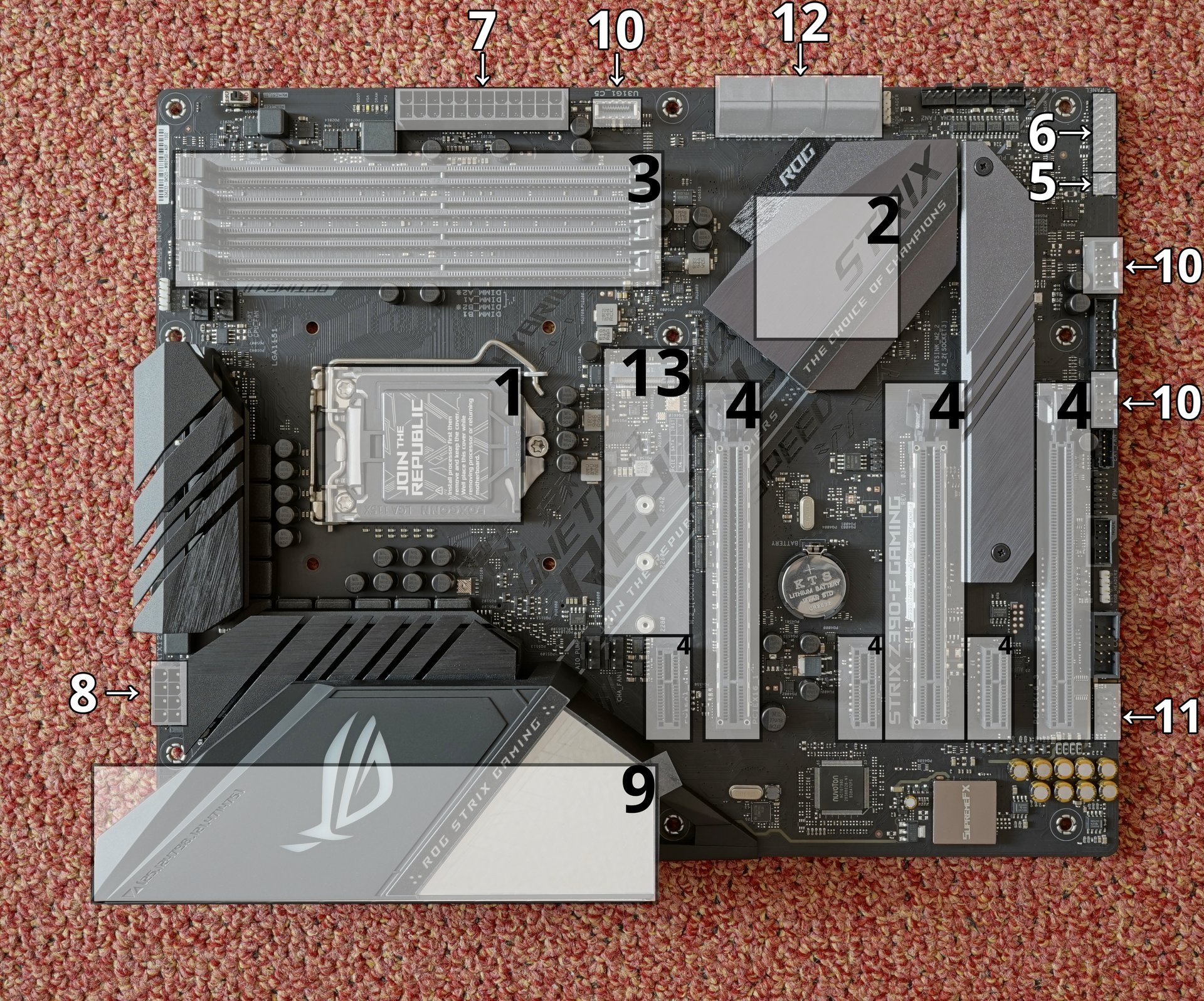
1 CPU socket (LGA1151) · 2 Chipset · 3 RAM slots (DDR4) · 4 PCIe slots (x16/x1) · 7 24-pin ATX power · 8 CPU power · 9 Rear I/O ports · 12 SATA ports · 13 M.2 slot
Activity: Identify the Components
Click each card to reveal what that motherboard component does.
🎬 A Tour of a Real Motherboard
📐 Motherboard Sizes: ATX, Micro-ATX, Mini-ITX
The board's form factor sets its size, its screw holes, and which cases it fits.
| Form factor | Size | Typical RAM slots | Expansion slots | Good for |
|---|---|---|---|---|
| ATX | 305 × 244 mm | 4 | Up to 7 | Gaming and workstation towers |
| Micro-ATX | 244 × 244 mm | 2–4 | Up to 4 | Office and budget PCs |
| Mini-ITX | 170 × 170 mm | 2 | 1 | Small living-room or desk PCs |
Smaller boards save space but give you fewer slots to upgrade later. A big case can hold a small board, but a small case cannot hold a big board.
Board sizes compared

The Heart of the System: CPU Socket
This is where the "brain" of the computer is installed.
The CPU Socket is a mechanical component that provides a physical and electrical connection between the Central Processing Unit (CPU) and the motherboard.
Crucial Point: The type of socket (e.g., LGA 1700, AM5) determines which CPUs are compatible with the motherboard. You cannot mix and match!
🎬 Installing a CPU
Quiz: CPU Socket Compatibility
Choose the correct answer for each question, then click Check.
Short-Term Memory: RAM Slots
These long, thin slots are for the computer's primary working memory.
RAM (Random Access Memory) is volatile memory that the CPU uses to hold data and instructions it is actively working on. Think of it as the computer's "workbench".
- More RAM generally means better multitasking performance.
- Most motherboards have 2 or 4 RAM slots.
Simulator: Fill the RAM Slots
Click each empty slot to insert an 8 GB stick. See how total memory changes.
Adding Capabilities: Expansion Slots
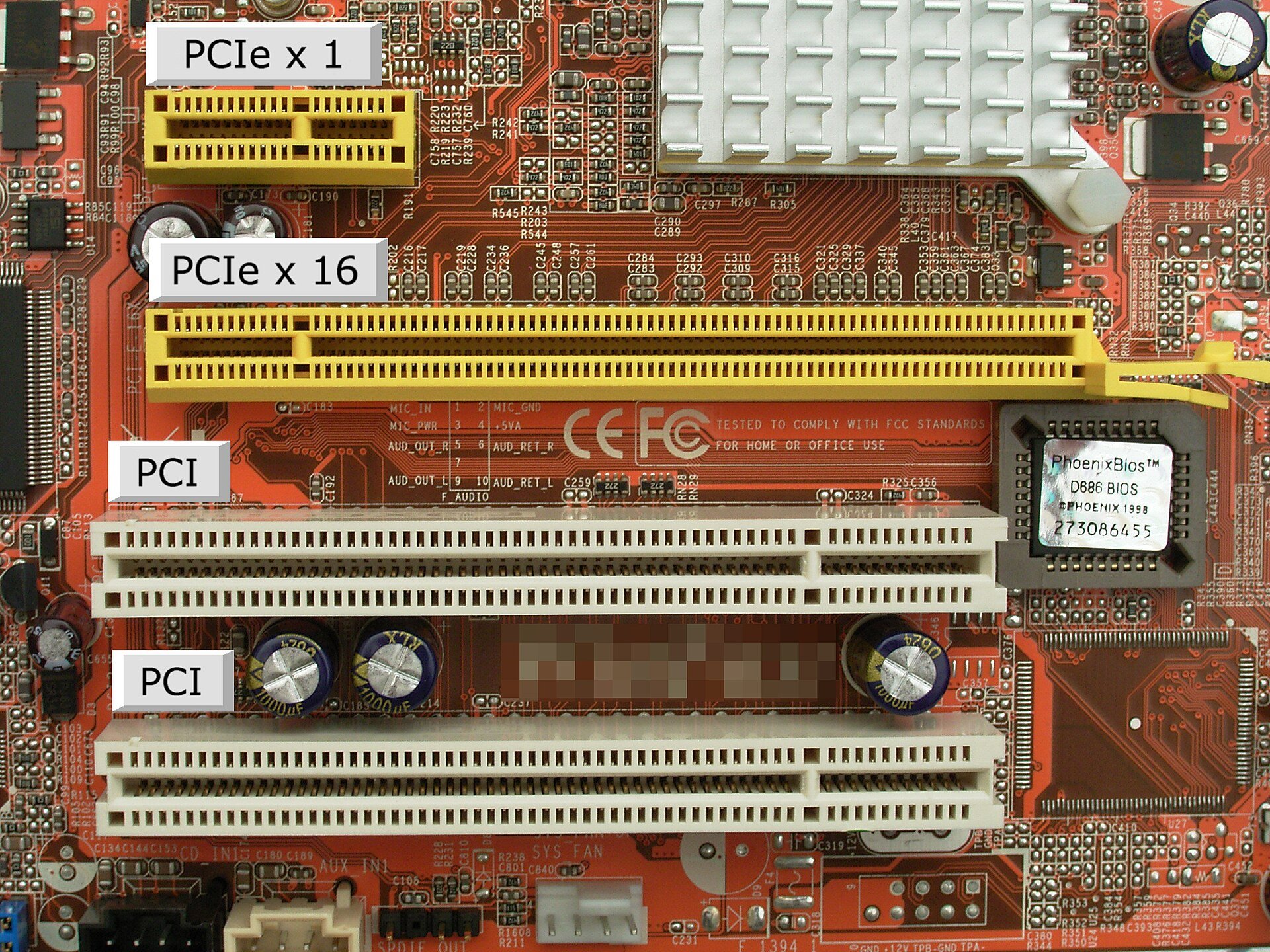
Expansion slots allow you to add new features or enhance existing ones by installing expansion cards.
⚡ The modern standard for expansion slots is PCI Express (PCIe).
PCIe slots come in different sizes (x1, x4, x8, x16) for different types of cards and bandwidth needs.
PCIe Slots Up Close
Common PCIe Expansion Cards
Graphics Cards (GPU)
The most powerful and common expansion card, used for gaming, video editing, and AI. Uses a PCIe x16 slot.
Sound Cards
Provide higher-quality audio than the motherboard's built-in sound. Uses a PCIe x1 slot.
Network Cards
Add faster Wi-Fi or Ethernet capabilities. Uses a PCIe x1 slot.
Storage Cards (NVMe)
Allow for ultra-fast SSDs to be connected directly via the PCIe bus.
🎬 Installing a Graphics Card
Match: Expansion Card to PCIe Slot Size
Click a card on the left, then click the correct PCIe slot size on the right. 4 cards to place.
Cards to place:
PCIe Slot Sizes:
Results:
🧮 Worked Example: How Fast Is a PCIe Slot?
Each PCIe lane is one data path. The "x" number is how many lanes a slot has. Every new PCIe version roughly doubles the speed of each lane.
| Version | Speed per lane (approx.) | x4 slot | x16 slot |
|---|---|---|---|
| PCIe 3.0 | 1 GB/s | 4 GB/s | 16 GB/s |
| PCIe 4.0 | 2 GB/s | 8 GB/s | 32 GB/s |
| PCIe 5.0 | 4 GB/s | 16 GB/s | 64 GB/s |
Copy a 50 GB game:
- SATA SSD at about 550 MB/s: 50,000 ÷ 550 ≈ 91 seconds
- NVMe SSD on PCIe 4.0 x4 at about 7,000 MB/s: 50,000 ÷ 7,000 ≈ 7 seconds
The Traffic Controller: The Chipset
The chipset is a set of microchips that acts as the communication hub and traffic controller for the entire motherboard.
Function: The chipset manages the flow of data between the CPU, RAM, expansion slots, and storage devices. It determines what features the motherboard supports (e.g., USB versions, number of SATA ports).
Think of it as the air traffic control tower of the motherboard, ensuring data gets to the right place without collisions.
Simulation: Chipset Data Routing
Click a source component to send data. Watch how the chipset routes it to the correct destination.
Hub
Connecting Everything: Storage & Power
📊 Storage Connectors
These ports connect your storage drives.
- SATA (Serial ATA): The most common connector for Hard Disk Drives (HDDs) and 2.5-inch Solid-State Drives (SSDs).
⚡ Power Connectors
These receive power from the Power Supply Unit (PSU).
- 24-pin ATX: The main connector that powers the motherboard.
- 8-pin CPU: Provides dedicated power to the CPU.
🎬 Plugging in the Power Cables
💽 M.2: Storage Without Cables
- M.2 is a small slot on the motherboard that holds a stick-shaped SSD (and sometimes a Wi-Fi card). It needs no data or power cable.
- The size is in the name: an M.2 2280 drive is 22 mm wide and 80 mm long, which is the most common size.
- Two kinds look almost the same:
- M.2 SATA: the same speed as a SATA SSD, about 550 MB/s
- M.2 NVMe: uses PCIe lanes, so it reaches several GB/s
Check the motherboard manual before buying. Some M.2 slots take only NVMe, some only SATA, and on some boards using an M.2 slot disables a SATA port.
Practical Application: Building a PC in Nepal
Scenario: Assembling a Mid-Range PC
You're buying parts from a computer market like Putalisadak or New Road in Kathmandu.
- Step 1: Choose your CPU. Let's say you pick an AMD Ryzen 5.
- Step 2: Match the Motherboard. You must find a motherboard with the correct CPU socket (e.g., AM4 or AM5 for Ryzen). The shopkeeper will help, but you should double-check the box!
- Step 3: Check RAM & GPU. Ensure the motherboard supports the RAM type (e.g., DDR4/DDR5) and has a PCIe x16 slot for your chosen graphics card.
Key Takeaway: Compatibility is king! The motherboard choice dictates what other components you can use.
🕵️ Spot the Problem: Putalisadak Build Check
A shop has written up four builds. Three have a mistake. Which one is fine, and what's wrong with the others?
A. Ryzen 5 7600 (AM5) + B650 board (AM5) + 16 GB DDR4 RAM
❌ AM5 boards take DDR5 only.
B. Mini-ITX board + two graphics cards for "double power"
❌ Mini-ITX has only one expansion slot.
C. Core i5-12400 (LGA 1700) + B760 DDR5 board (LGA 1700) + 16 GB DDR5
✅ Socket and RAM type both match.
D. Core i5-14400F (LGA 1700) + matching board + RAM, with no graphics card
❌ "F" chips have no built-in graphics, so the screen stays blank without a graphics card.
Summary & Key Takeaways 🎯
- The motherboard is the central hub that connects all computer components.
- The CPU socket and RAM slots hold the computer's brain and short-term memory, respectively. Compatibility is critical.
- Expansion slots (PCIe) allow for adding new functionality like powerful graphics cards.
- The chipset acts as the motherboard's traffic controller, managing data flow between all parts.
Image & Video Credits
Images (Wikimedia Commons)
- Asus ROG Strix Z390-F Gaming motherboard with labels: PantheraLeo1359531, CC BY 4.0 — https://upload.wikimedia.org/wikipedia/commons/thumb/d/db/Asus-ROG-Strix-Z390-F-Gaming-Motherboard_mit_Markierungen_20201120_DSC6025.png/1920px-Asus-ROG-Strix-Z390-F-Gaming-Motherboard_mit_Markierungen_20201120_DSC6025.png
- PCI and PCIe slots: Smial (German Wikipedia), CC BY-SA 2.0 de — https://upload.wikimedia.org/wikipedia/commons/thumb/0/0c/PCI_und_PCIe_Slots.jpg/1920px-PCI_und_PCIe_Slots.jpg
- VIA Mini-ITX Form Factor Comparison: VIA Gallery from Hsintien, Taiwan, CC BY 2.0 — https://upload.wikimedia.org/wikipedia/commons/thumb/1/11/VIA_Mini-ITX_Form_Factor_Comparison.jpg/1280px-VIA_Mini-ITX_Form_Factor_Comparison.jpg
- Samsung 960 EVO in M.2 slot: Ilya Plekhanov, CC BY-SA 4.0 — https://upload.wikimedia.org/wikipedia/commons/thumb/3/39/Samsung_960_EVO_in_M.2_slot_01.jpg/1920px-Samsung_960_EVO_in_M.2_slot_01.jpg
- IBM PC Motherboard (1981): German, CC BY-SA 3.0 — https://upload.wikimedia.org/wikipedia/commons/thumb/5/57/IBM_PC_Motherboard_%281981%29.jpg/1920px-IBM_PC_Motherboard_%281981%29.jpg


Video (YouTube)
- GeekaWhat, "How to Build a Gaming PC in 2026!": motherboard tour (3:50 to 4:48), CPU install (5:19 to 6:27), power cables (17:48 to 18:42), graphics card install (20:58 to 21:54)
Exam Practice 📝
Short answer
- What is a motherboard? List four components on it.
- What is the function of the chipset?
- What is BIOS? What is POST?
Exam Practice 📝 (continued)
Long answer
- Describe the main components found inside a computer cabinet and their functions.
- An office computer is slow. Explain which internal components you would check or upgrade, and why.
Revise the answers in the full note linked on the last slide.
Thank You
Questions before we wrap this hour?
Next: Unit 3 · Session 3 — Memory Hierarchy and Representation
📖 Related chapter notes
Read first, then revise with this deck: