Unit 3.3
The Database Approach and Relational Model

Learning Objectives 🎯
By the end of this chapter, you will be able to:
- ✅ Define the database approach and the role of a Database Management System (DBMS).
- ✅ Explain the key advantages of the database approach, like minimizing redundancy.
- ✅ Describe the basic components of the relational database model.
- ✅ Understand the purpose of a data model and an Entity-Relationship Diagram (ERD).
The Old Way: File-Based Chaos
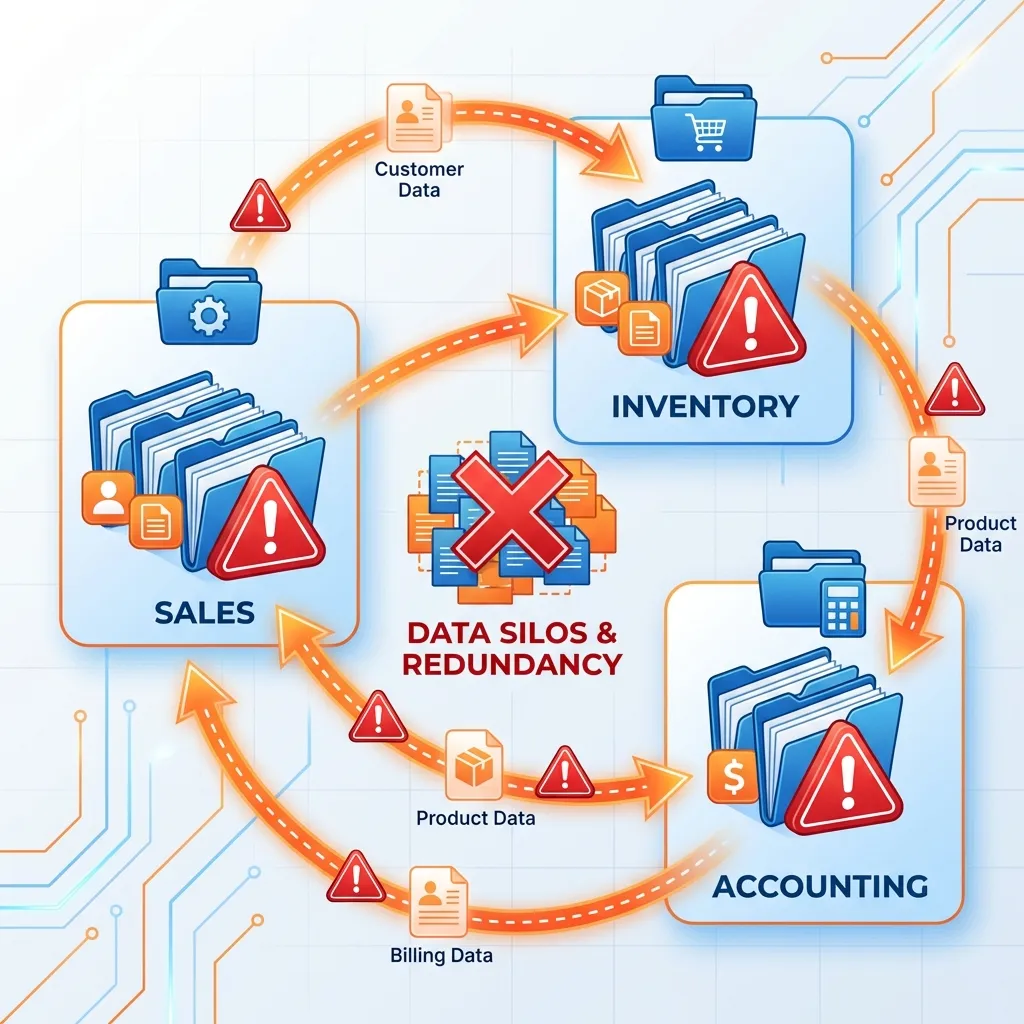
Before databases, every application stored its own data in separate files.
Problems 🌪️
- Data Redundancy: Same data (e.g., customer address) stored in multiple files.
- Data Inconsistency: Updating one file didn't update others.
- Data Isolation: Difficult to share data between departments.
- Poor Security: Hard to control who sees what data.
The Solution: The Database Approach
A modern approach that creates a centralized, shared repository of data.
The goal is to create a "single source of truth" for the entire organization.
Database 🗃️
A logically coherent collection of related data.
DBMS ⚙️
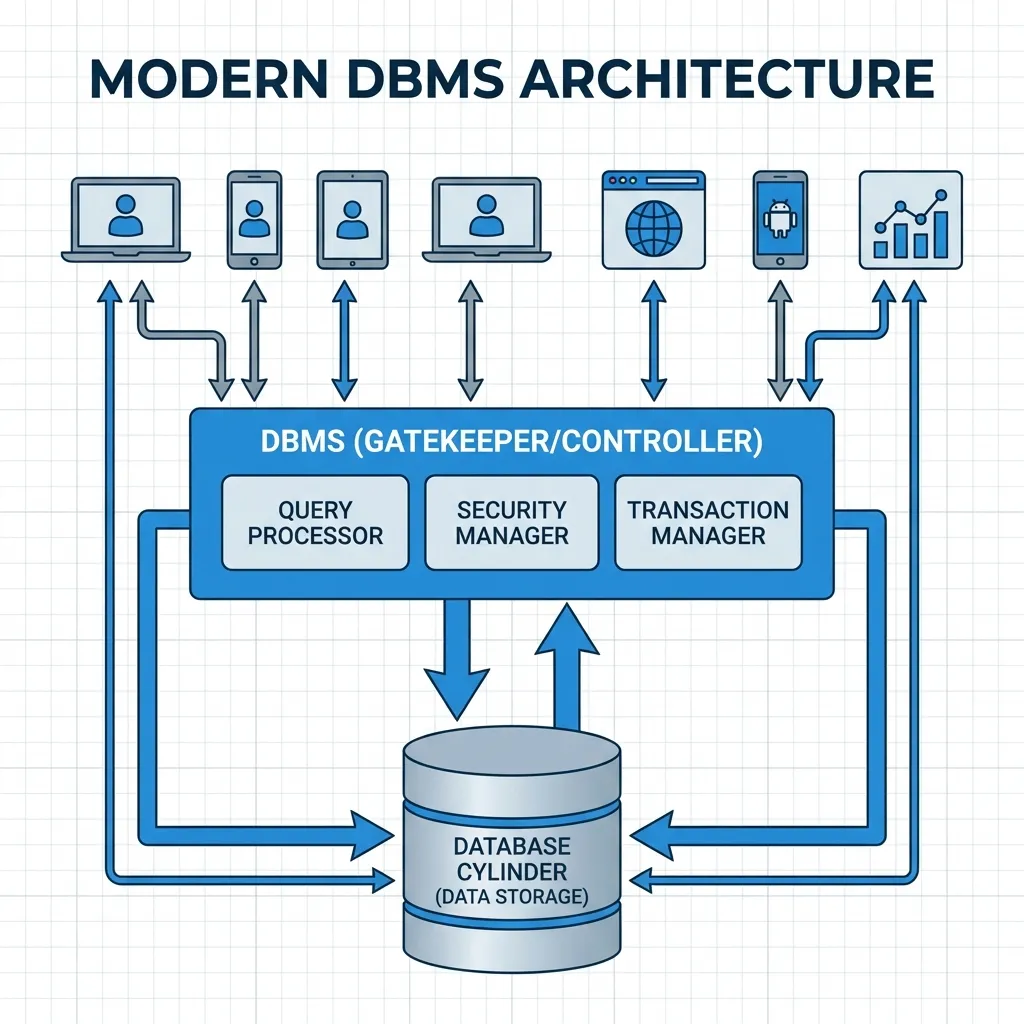
The software that manages and controls access to the database.
Examples of DBMS: MySQL, Oracle, Microsoft SQL Server, PostgreSQL
How it Works: The DBMS as Gatekeeper
Applications and users don't touch the data directly. They go through the DBMS.


Key Advantages of the Database Approach ⚡
1. Minimizes Redundancy & Inconsistency
Data is stored once. An update in one place is an update for everyone.
This creates a "Single Source of Truth", ensuring all departments use the same, correct data.
2. Improves Data Sharing & Integration
Centralized data is easy to share across departments, providing a holistic view of the business.
More Advantages...
3. Increases Data Security 🔒
The DBMS provides a sophisticated security framework.
- Define precise user access controls.
- Grant specific permissions (Read, Create, Update, Delete).
- Centralized security is easier to manage.
4. Enforces Data Standards & Integrity
The DBMS can enforce rules to ensure data quality.
Example Rule: An `order_quantity` field must be a positive number. The DBMS will reject any attempt to enter a negative value.

The Relational Model: Organizing the Data 📊
The most popular database model. Data is organized into tables (relations).
Table (Relation)
A collection of rows and columns.
Row (Record)
Represents a single item or entity (e.g., one customer).
Column (Field)
Represents a characteristic of that entity (e.g., customer name).
Example: A `Customers` Table
CustomerID | FirstName | LastName  | City
-----------|-----------|-----------|-----------
101        | Ram       | Thapa     | Kathmandu
102        | Sita      | Sharma    | Pokhara
Connecting the Dots: Primary & Foreign Keys
Tables are linked together using special columns called keys.
🔑 Primary Key (PK)
A unique identifier for each row in a table. No two rows can have the same PK.
Example: `CustomerID` in the `Customers` table.
🔗 Foreign Key (FK)
A primary key from one table that is placed in another table to create a link.
Example: `CustomerID` in the `Orders` table.
This link allows us to see all orders placed by a specific customer!
Designing a Database: The Blueprint 🔍
Before building, you must design. This is done with a data model.
Data Model: An abstract diagram that illustrates the data structure and relationships between different pieces of data.
A common tool for this is the Entity-Relationship Diagram (ERD).

Core Components of an ERD
ERDs visually represent the database structure using three main components:
1. Entities
The "things" we store data about.
e.g., Customer, Product, Order
2. Attributes
The properties or characteristics of an entity.
e.g., CustomerName, ProductPrice
3. Relationships
How entities are connected to each other.
e.g., A Customer `places` an Order.
Practical Application: Databases in Nepal
The database approach is the backbone of modern digital services.
🛒 E-commerce: Daraz
A central database stores `Products`, `Customers`, and `Orders`. This single source of truth ensures your cart is accurate and sellers know what to ship.
💳 Digital Wallets: eSewa / Khalti
Your `UserID` (Primary Key) links your account to all your `Transactions`. The DBMS ensures security and data integrity for every payment.
🚗 Government: DOTM Vehicle Registration
A national database links `Vehicle` information to `Owner` information using keys, helping manage taxes ("blue book") and ownership records efficiently.
Summary & Key Takeaways
- The database approach uses a central database and a DBMS to solve the problems of old file-based systems.
- It creates a "single source of truth", minimizing redundancy and improving data sharing, security, and integrity.
- The relational model is the most common, organizing data into tables linked by primary and foreign keys.
- Entity-Relationship Diagrams (ERDs) are used as blueprints to design the structure of a database before it is built.
Thank You
Any questions?
Next Up: Unit 3.4 - Introduction to SQL