Unit 3 · Session 7
Input and Output Devices
🎯 Learning Objectives
By the end of this session, you will be able to:
- ✅ Differentiate between an input device and an output device.
- ✅ Identify common types of input devices.
- ✅ Identify common types of output devices.
Input and Output Devices of a Computer
The Human-Computer Bridge
Input and Output (I/O) devices are the peripherals that allow us to interact with a computer.
Input Devices ➡️
Send data and instructions TO the computer.
(You talking to the computer)⬅️ Output Devices
Receive feedback and results FROM the computer.
(The computer talking to you)Input Devices: Sending Data IN
Definition: Input devices translate our real-world actions (like keystrokes, movements, and sounds) into digital data that the computer can process.
Human Action 🚶 → Input Device ⌨️ → Digital Data 💻
Common Input Devices ⌨️🖱️
Keyboard
The most common input device for typing text and executing commands.
Mouse
A pointing device used to control the on-screen cursor and interact with the GUI.
Microphone 🎙️
Captures audio and converts it into a digital format for recording or voice commands.
Scanner 📄
Converts physical documents, photos, or drawings into digital image files.
🎬 Inside an Optical Mouse
🎬 How a Keyboard Detects a Key
🌍 Specialised Input Devices Around the World
Barcode Scanner
Reads product codes at supermarket checkouts in a fraction of a second.
MICR Reader
Reads the magnetic-ink numbers printed along the bottom of bank cheques.
Contactless (RFID/NFC) Reader
Reads London's Oyster travel card or a tap-to-pay bank card by radio, with no contact.
Motion Sensors
A Nintendo Wii remote or a smartphone uses an accelerometer to turn movement into input.
Output Devices: Getting Feedback OUT
Definition: Output devices translate the computer's processed digital data back into a form that humans can see, hear, or touch.
Digital Data 💻 → Output Device 🖥️ → Human Perception 👀
Common Output Devices 🖥️🖨️
Monitor (Display)
The primary output device, displaying text, graphics, and video.
Printer
Produces a physical "hard copy" of digital text and images on paper.
Speakers / Headphones 🎧
Produce audio output, from system sounds to music and voice.
Projector 📽️
Displays the computer's screen output onto a larger surface for presentations or viewing.
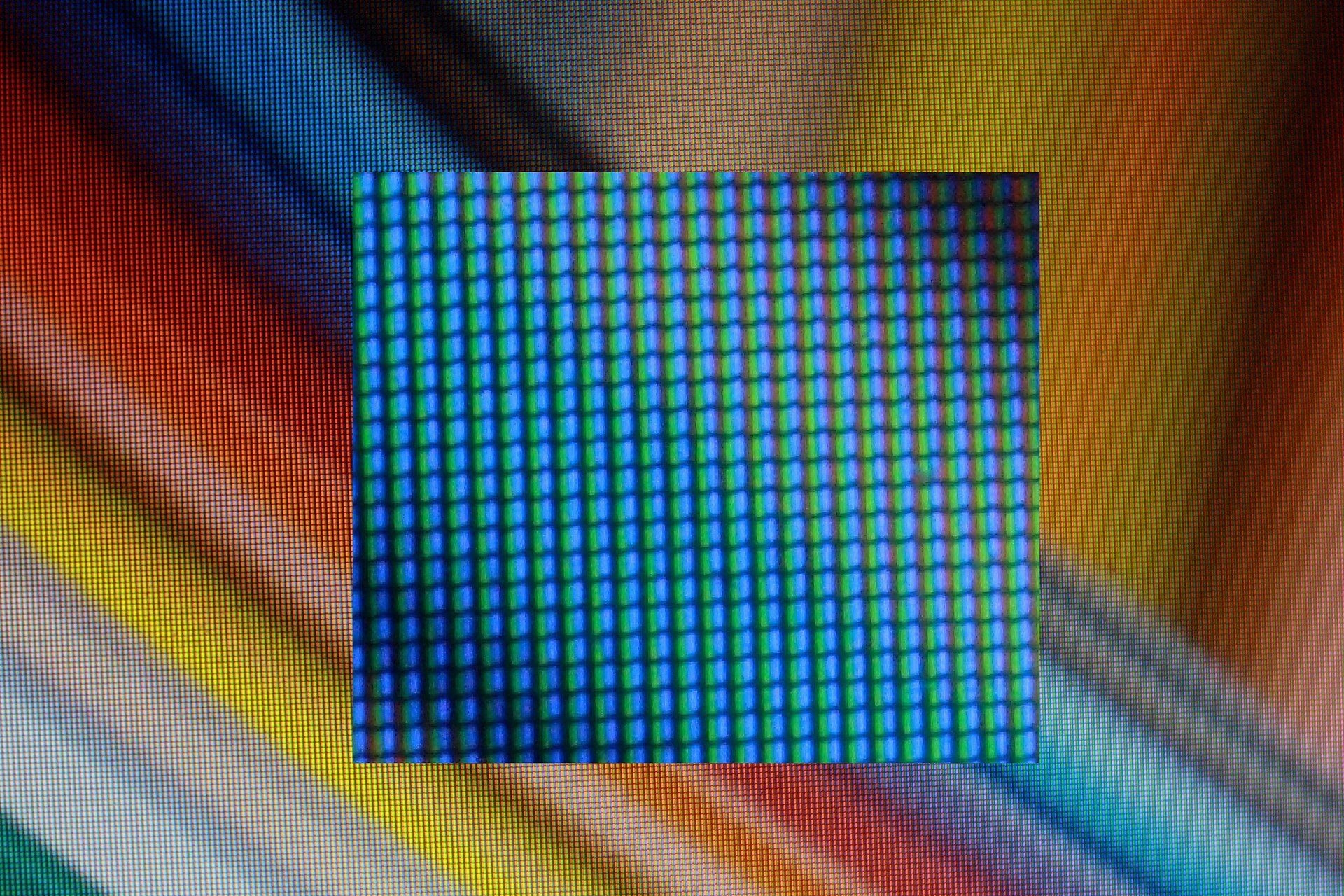
Red, Green and Blue Subpixels
🧮 Counting Pixels: Resolution
A Full HD screen is 1920 × 1080 pixels. How many pixels is that, and how many subpixels?
Pixels: 1920 × 1080 = 2,073,600, about 2 million
Subpixels: 2,073,600 × 3 (red, green, blue) = 6,220,800
4K (3840 × 2160) has exactly four times as many pixels: 8,294,400.
Printers measure sharpness in DPI (dots per inch) instead. About 300 DPI is a common standard for sharp printed photos.
🎬 How a Laser Printer Prints
🌍 Specialised Output Devices
3D Printer
Builds a physical object layer by layer, for prototypes, dental crowns and spare parts.
Refreshable Braille Display
Raises and lowers small pins so blind users can read screen text by touch.
Haptic Feedback
The vibration you feel from a phone or game controller is output you can touch.
VR Headset
Puts a separate screen in front of each eye to create a 3D world.
♿ Case Study: Stephen Hawking's Input Device
Motor neurone disease (ALS) left physicist Stephen Hawking unable to type or speak.
- Input: an infrared sensor on his glasses detected small twitches of his cheek muscle.
- Processing: Intel's ACAT software moved a cursor across letters and predicted his next words.
- Output: a speech synthesiser read his sentences aloud.
Discuss: What other input devices could help someone who can't use a keyboard or mouse?
Input, Output, or Both? The Touchscreen 🤔
Discussion Point: Is a smartphone screen an input or output device?
- As an Input Device: You provide input by tapping icons, swiping between screens, and typing on the virtual keyboard.
- As an Output Device: It displays the user interface, videos, images, and text from the phone's processor.
Conclusion: It's both! A touchscreen is a classic example of a hybrid I/O device.
🎬 How a Touchscreen Feels Your Finger
⚡ Quick-Fire: Input, Output, or Both?
Call out your answer, then reveal.
Webcam Input
Projector Output
Barcode scanner Input
3D printer Output
Headset with mic Both
Game controller with vibration Both
I/O Devices in Nepal 🇳🇵
Let's look at some practical examples you might see every day.
Input in Nepal
- QR Code Scanners: Essential for digital payments via eSewa, Khalti, and Fonepay at local shops.
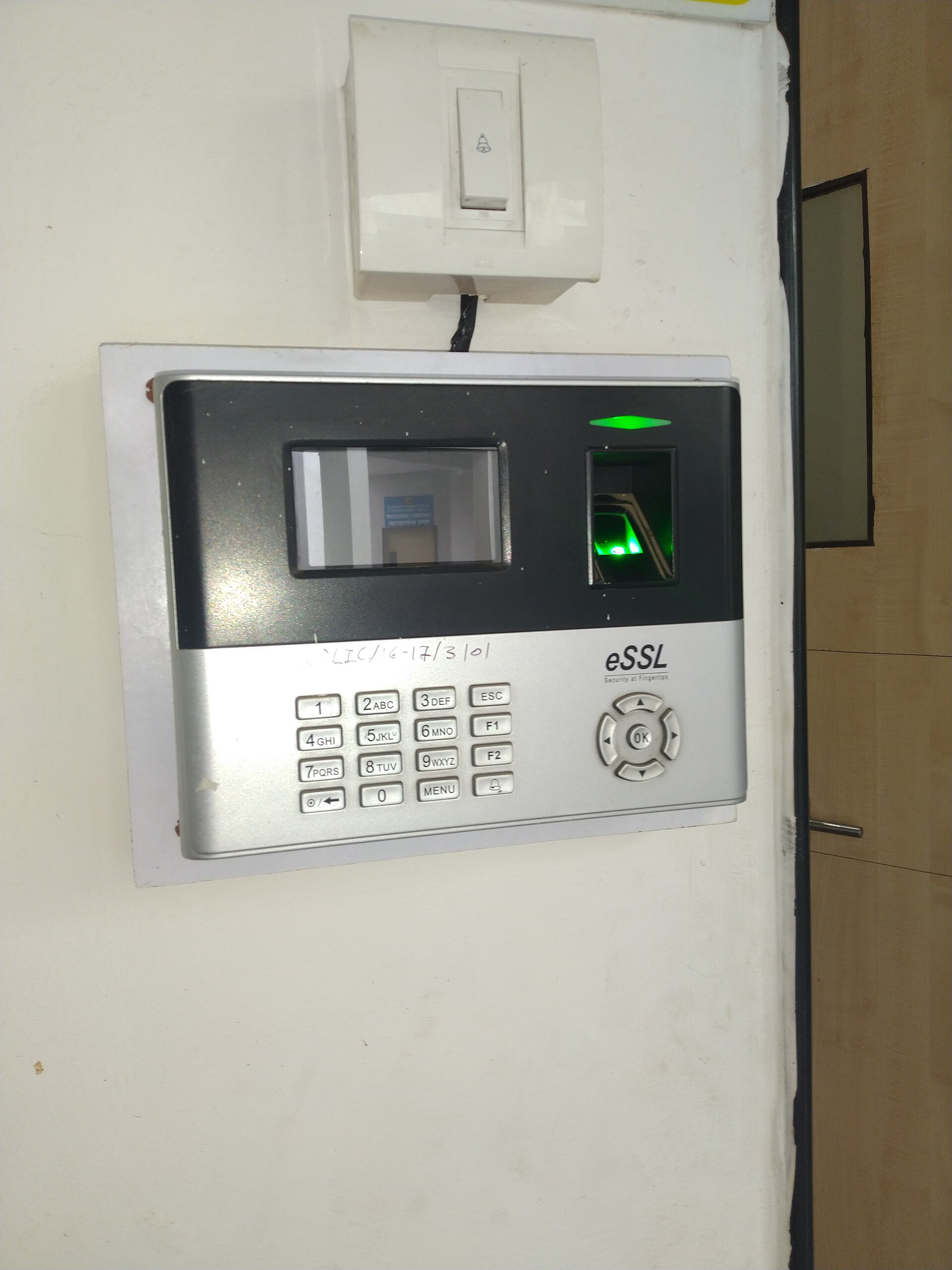
- Biometric Scanners: Used for the National ID card system and at some government offices for attendance.
Output in Nepal
- Digital Notice Boards: Displaying information at universities, hospitals, and public transport hubs in Kathmandu.
- Printers: Crucial in every "karyalaya" (office) for printing official documents, letters ("patra"), and reports.
A Fingerprint Attendance Terminal
🛠️ Activity: Design the I/O
In groups of three, pick one machine and list every input and output device it needs. You have 3 minutes.
- An ATM
- A supermarket self-checkout
- A modern car dashboard
Sample answer for an ATM. Inputs: card reader, PIN pad, touchscreen, camera. Outputs: screen, cash dispenser, receipt printer, speaker.
Key Takeaways 🔑
- Input devices send data TO the computer. (e.g., Keyboard, Mouse)
- Output devices receive data FROM the computer. (e.g., Monitor, Printer)
- These devices form the essential bridge between humans and machines.
- Some devices, like touchscreens, can be both input and output.
Image & Video Credits
Images (Wikimedia Commons)
- Input devices montage, built from photos by Karl432 (CC BY-SA 4.0), Jacek Halicki (CC BY-SA 4.0), Marie-Lan Nguyen (CC BY 2.5) and Santeri Viinamäki (CC BY-SA 4.0); montage shared under CC BY-SA 4.0
- Keyboard: "Brazilian computer keyboard (produced 2016)": Karl432, CC BY-SA 4.0 — https://commons.wikimedia.org/wiki/File:Brazilian_computer_keyboard_(produced_2016).jpg
- Mouse: "2023 Mysz komputerowa Logitech M705": Jacek Halicki, CC BY-SA 4.0 — https://commons.wikimedia.org/wiki/File:2023_Mysz_komputerowa_Logitech_M705.jpg
- Microphone: "Blue Snowflake USB microphone": Marie-Lan Nguyen, CC BY 2.5 — https://commons.wikimedia.org/wiki/File:Blue_Snowflake_USB_microphone.jpg
- Scanner: "Epson V850 scanner open 20230920": Santeri Viinamäki, CC BY-SA 4.0 — https://commons.wikimedia.org/wiki/File:Epson_V850_scanner_open_20230920.jpg
- "LCD subpixels": Politelyinsulting, CC BY-SA 3.0 — https://commons.wikimedia.org/wiki/File:LCD_subpixels.jpg
- "Biometric Fingerprint Scanner": Sanskritibharti1398, CC BY-SA 4.0 — https://commons.wikimedia.org/wiki/File:Biometric_Fingerprint_Scanner.jpg
.jpg)


Videos (YouTube)
- CORSAIR, "Gaming Mice - Linus Explains Optical Sensors" (0:29 to 1:20)
- Joe Scotto, "How a Mechanical Keyboard Works (Matrix and Direct Wiring)" (1:54 to 2:41)
- Static Control, "How a Color Laser Printer Works -- Inside an HP 2600 Toner Cartridge" (0:08 to 1:40)
- SciShow, "How Do Touchscreens Work?" (1:38 to 2:38)
Exam Practice 📝
Short answer
- Differentiate between input and output devices with two examples each.
- Write short notes on OMR, OCR, and MICR.
- Differentiate between impact and non-impact printers.
Long answer
- Explain different types of input devices with their uses in business.
- Describe the major output devices. Which devices would you recommend for a supermarket billing counter, and why?
Revise the answers in the full note linked on the last slide.
Thank You
Questions before we wrap this hour?
Next: Unit 3 · Session 8 — I/O Ports and the I/O System