Unit 2: Computer Hardware
Hardware Components and CPU
Today's Learning Objectives
- ✅ Identify core hardware components and their specific roles in business operations.
- ✅ Explain how CPU and RAM performance directly impacts business productivity and decision-making.
- ✅ Analyze the different hardware requirements for various business functions like Finance, HR, and Operations.
- ✅ Relate hardware choices to business strategy, cost, and overall efficiency.
What is Computer Hardware?
Think of it as the factory, the delivery trucks, and the office building of your digital business.
💼 **Business Implication:** Hardware is the foundation for ALL business data processing, from a simple sales transaction to complex financial modeling. The right hardware ensures reliability and speed.
The Core Components: A Business System
Imagine a business team. Each hardware component plays a distinct role.
📥 Input Devices
The Data Collectors
Keyboard, Mouse, Scanners. They gather raw data for the business.
⚙️ Processing Unit
The Decision-Makers
CPU and RAM. They process data and execute commands.
📤 Output Devices
The Communicators
Monitor, Printer. They present the processed information.
🗄️ Storage Devices
The Corporate Archive
SSD/HDD. They store business data for short and long-term use.
The "Brain" of Business: The CPU
Its core function is a 4-step cycle:
- Fetch: Retrieves instructions from memory (e.g., "calculate monthly payroll").
- Decode: Translates the instruction into signals the computer understands.
- Execute: Performs the calculation or action (e.g., runs the payroll calculation).
- Store: Sends the result back to memory (e.g., the final salary figures).
CPU Performance: What Matters for Business?
⚡ Clock Speed (GHz)
Measures how many cycles a CPU can execute per second. Think of it as speed.
Business Impact:
- 💰 Faster generation of complex financial reports in Excel.
- 📊 Quicker processing of large datasets for marketing analysis.
🧠 Cores & Threads
A core is a single processing unit. More cores mean more tasks can be handled at once. Think of it as multitasking ability.
Business Impact:
- 🤝 Running HR software, video calls, and email smoothly at the same time.
- ⚙️ Essential for servers handling requests from many employees simultaneously.
Activity: Match the CPU to the Job
Which CPU configuration is best for each business role?
💰 Finance Analyst: Runs massive, single-threaded Excel models and statistical software.
Answer: Prioritize high Clock Speed for faster single-task calculations.
🤝 HR Manager: Juggles a recruitment portal, payroll software, multiple web browsers, and video conferencing.
Answer: Prioritize More Cores for smooth, responsive multitasking.
The Central Hub: The Motherboard
The motherboard is the main circuit board connecting all components. It's the "central office" that enables communication between all departments of the computer.
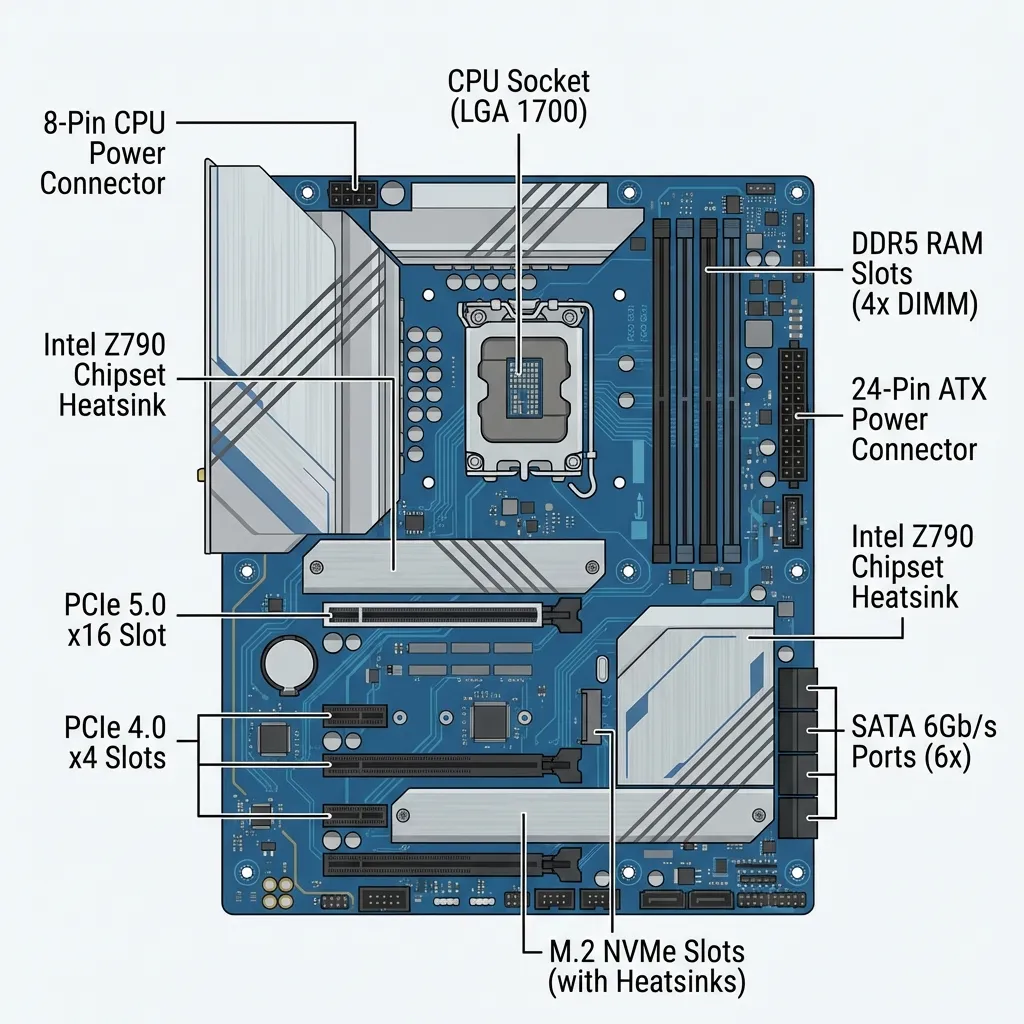
Its design determines the system's capabilities and potential for future upgrades (e.g., adding more RAM, a better graphics card for the design team, etc.).
RAM: The Active Workspace
Think of it like your office desk. The bigger the desk (more RAM), the more documents and tools you can have open at once without slowing down.
Business Impact:
- 📊 More RAM = Smoother multitasking between business apps (e.g., Tally, SAP, Excel, Chrome).
- 📉 Insufficient RAM = System slowdowns, lost productivity, and employee frustration. A common bottleneck in office PCs.
Storage: The Corporate Archive (HDD vs. SSD)
HDD (Hard Disk Drive)
Mechanical drive with spinning platters.
- ✅ Low cost per GB
- ✅ High capacity
💼 Business Use:
Cost-effective for backing up company data, archiving old financial records, and storing large, infrequently accessed files.
SSD (Solid State Drive)
Uses flash memory with no moving parts.
- ✅ Extremely fast
- ✅ More durable
💼 Business Use:
For operating systems and frequently used applications. Dramatically speeds up boot times and software loading, boosting daily employee productivity.
Input & Output: The Flow of Business Information
📥 Input Devices
How data gets INTO the system.
- Barcode Scanner: ⚙️ Tracks inventory in a warehouse (Operations).
- Biometric Scanner: 🤝 Manages employee attendance (HR).
- Document Scanner: 💰 Digitizes invoices and contracts (Finance).
📤 Output Devices
How information gets OUT to users.
- Printer: 💰 Prints year-end financial statements (Finance).
- Projector: 🎯 Presents marketing campaign results to stakeholders.
- Monitor: The primary screen for ALL business tasks, from data entry to analysis.
Hardware in Action: The Nepali Business Context
eSewa (FinTech)
Relies on high-performance servers with multi-core CPUs and vast amounts of RAM to process thousands of digital payments concurrently. Fast SSDs are crucial for quick database access and transaction logging.
Daraz (E-commerce / Operations)
In their warehouses, employees use rugged handheld devices with integrated barcode scanners (Input) to manage inventory. Their data analysts use powerful workstations with high-end CPUs to analyze customer purchasing patterns.
CG Foods (Manufacturing)
The Wai Wai noodle production line uses industrial computers and sensors (Input) to monitor quality and speed. The supply chain division uses GPS units in trucks to track deliveries, providing data for logistical analysis.
Summary & Key Takeaways
- Hardware is the physical foundation that runs all business software and processes. Choosing the right tools is critical.
- The CPU (for speed/multitasking) and RAM (for active work) directly determine a computer's performance and employee productivity.
- Different business functions have unique hardware needs. A finance analyst's PC should be different from a receptionist's.
- Strategic hardware investment (e.g., SSDs over HDDs for primary drives) can provide a significant competitive advantage by improving efficiency and speed of operations.
Thank You!
Any Questions?
Next Topic: Memory and Storage Devices